

Hostinger Deep Dive: AI Simplicity and Entry-Level Value

Imagine the scene: it is 2 AM, and you are staring at a blank screen, trying to figure out how to connect a domain name to a hosting account. The excitement of starting a new business or launching a personal project has quickly dissolved into frustration. You are surrounded by terms like DNS, nameservers, and database allocation. You start to wonder if you need to hire an expensive developer just to get a basic homepage online. This is the exact moment of anxiety that stops thousands of potential website owners before they even begin. The fear of getting stuck in a technical loop, combined with the worry of overpaying for resources you do not understand, makes the hosting market feel incredibly hostile to beginners. If you are comparing options, you want a path that bypasses this technical wall without draining your wallet. This is where Hostinger enters the conversation. Positioned as a budget-friendly entry point, the provider promises to remove the complexity of launching a website through its new AI-driven creation tools and low starting rates. But does a low entry price mean you will face hidden compromises later?
To help you make a confident decision, this review will evaluate the real value behind the entry-level plans. We will test the simplicity of the new AI Horizons builder to see if it actually eliminates the need for manual design work. We will also analyze the support responsiveness and the terms of the 30-day money-back guarantee, ensuring you know exactly what to expect before you enter your credit card details. Finally, we will look at the long-term path for scaling your site, helping you understand when to stick with basic hosting and when to transition to more powerful resources. The goal is to give you a clear, jargon-free look at whether this platform fits your budget and your technical comfort level. We want to ensure you do not end up paying for features you do not need, while also avoiding the frustration of a site that loads too slowly or crashes when your first major wave of traffic arrives. By looking closely at the balance between introductory discounts and renewal rates, we aim to provide an objective, realistic assessment of what it is like to host your website with this provider over the long term.
Can Horizons AI Simplify Your Website Setup?
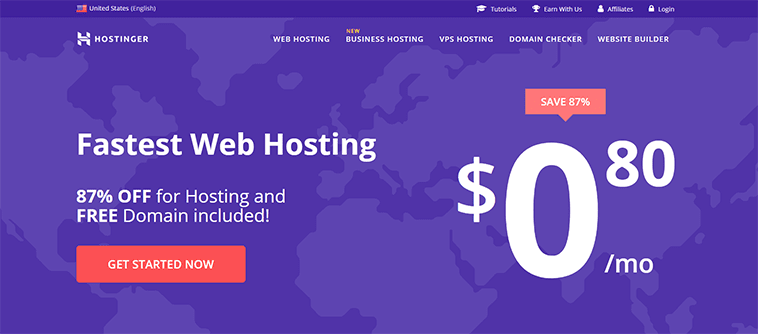
The transition from a blank canvas to a live website is the most vulnerable phase of any online project. Most beginners do not quit because their business idea is bad; they quit because the design tools feel too complicated or the setup process takes too long. If you have ever tried to align a simple image next to a block of text in an outdated editor, you know the frustration. The promise of modern web tools is that you should not have to write code to look professional. The reality, however, is that many builders still require a steep learning curve. For searchers landing here, the primary question is whether the setup process is actually simple or just marketed that way. When you are trying to get a business off the ground, you do not have time to learn web development. You need an interface that guides you through the process step-by-step, removing the guesswork. The platform focuses heavily on this onboarding experience, aiming to make the transition from purchasing a plan to launching a site as smooth as possible. By focusing on visual cues and guided setups, the system attempts to bridge the gap between technical hosting and intuitive design.
This matters if you want to launch a site without spending weeks on design. A buyer does not want to spend hours adjusting margins; they want to see if their idea resonates with real people. The AI tool aims to deliver a layout with minimal manual adjustments, allowing you to focus on refining your message rather than wrestling with design elements. It is designed to be an interactive process that makes the initial launch feel less like a chore and more like a creative exercise. By automating the layout generation, the platform helps you bypass the initial design phase entirely, which is often where projects stall.
From Idea to Layout Without Writing Code
The introduction of the AI Website Builder represents a shift in how websites are constructed. Instead of starting with a blank template and dragging boxes around, you describe what you want in plain language. The AI assistant then generates a customized layout, complete with images and text tailored to your description. This matters if you want to test a business concept quickly without spending weeks on design. A buyer does not want to spend hours adjusting margins; they want to see if their idea resonates with real people. The AI tool aims to deliver a layout with minimal manual adjustments, allowing you to focus on refining your message rather than wrestling with design elements. It is like having a digital designer at your disposal.
This approach is particularly beneficial for those who feel intimidated by traditional content management systems. You do not need to know how to install themes or configure plugins to get started. The AI handles the initial layout generation, giving you a functional starting point that you can then customize. While professional designers might find the AI-generated layouts somewhat simplistic, for a beginner, they provide a clean, modern foundation that looks professional right out of the gate. It removes the initial paralysis that often stops new projects before they start. You can simply type a prompt, watch the system generate the pages, and then tweak the text and images to match your brand. This interactive process makes the initial launch feel less like a chore and more like a creative exercise.
WordPress Setup Without the Usual Technical Friction
For those who prefer the flexibility of WordPress but dread the setup process, the platform offers a simplified path. WordPress is powerful, but configuring it can feel like learning a new language. The quick-start WordPress setup allows you to create a site using AI, select a pre-built template, or start from scratch without the usual database configuration headaches. This is a crucial relief point for users who want the SEO benefits and plugin ecosystem of WordPress but do not want to manage the technical backend. By handling the initial installation and offering guided templates, the system allows you to jump straight into customizing your content.
The focus is on making the platform accessible, ensuring that you can manage your site without needing to understand the underlying server architecture. If you are comparing options, this managed approach to WordPress is highly valuable because it saves you from the common pitfalls of manual installations, such as broken database connections or incorrect file permissions. You get the power of WordPress with the ease of a managed service, allowing you to focus on your content rather than server maintenance. This setup is designed to be intuitive, meaning you can install essential plugins, update your themes, and manage your media library from a centralized dashboard that does not require technical expertise.
Automating the Busywork of Ongoing Site Maintenance
Once your site is live, the work does not stop. You have to worry about updates, security patches, and backups. For a beginner, this ongoing maintenance is often more intimidating than the initial setup. The platform addresses this by automating the busywork, allowing you to focus on growing your business. Through integrations like n8n hosting, you can automate routine tasks and turn complex workflows into simple, automated processes. This level of automation is particularly valuable for agencies or users managing multiple websites, as it reduces the time spent on administrative tasks.
By taking care of site maintenance, speed, and security in the background, the hosting environment allows you to run your site with the confidence that it remains secure and updated without your daily intervention. This is especially important for small business owners who do not have a dedicated IT department. You can rest easy knowing that your site is protected by automated security measures, reducing the risk of downtime or data loss due to unpatched vulnerabilities. The system monitors your site’s health, applies critical updates automatically, and ensures that your backups are created regularly, giving you a reliable safety net that operates silently in the background.
Which Hidden Hosting Costs Should You Avoid?
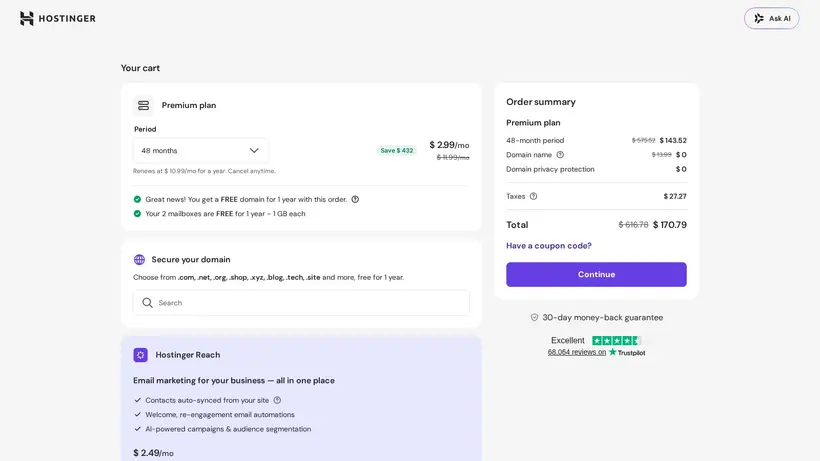
The checkout screen is a place of optimism. You see a low price, click buy, and feel a sense of accomplishment. However, the real test of a hosting provider comes when the promotional period ends and the renewal bill arrives. Many beginners fall into the trap of signing up for a cheap plan without realizing that the price will double or triple upon renewal. Understanding the long-term financial commitment is just as important as evaluating the initial features. You need to know if the service remains a good value once the introductory discount expires.
A better way to read this is to look at the total cost of ownership over two or three years, rather than just the first month. While low introductory rates are great for getting started, you must ensure that the renewal rates fit within your long-term budget. This transparency is crucial for small businesses and individuals who need to manage their cash flow carefully. If you do not plan for these increases, you might find yourself forced to migrate your site under pressure when the renewal bill arrives, which can lead to downtime and lost traffic.
The Reality of the Entry Level Pricing Structure
The starting price of $2.99 per month is highly attractive for anyone on a tight budget. This low rate is part of a promotional sale offering up to 80% off the standard pricing. While this makes the initial signup incredibly affordable, the lack of explicit renewal rates in the primary plan details means you must plan for future increases. A better way to read this is to view the first term as a low-cost trial period. You can launch your site, build your audience, and determine if the platform is generating enough value to justify the standard renewal rate.
For searchers landing here, the key is to check the renewal terms during checkout so you are not surprised by the next billing cycle. While cheap hosting is excellent for minimizing your initial investment, you must balance the upfront savings against the long-term costs. If your site is successful, the renewal price will likely be a minor expense compared to the revenue your site generates, but it is still a detail you should track from day one. By understanding the pricing structure early, you can make an informed decision about which billing term offers the best balance of upfront savings and long-term stability.
Protecting Your Investment with Clear Refund Policies
Signing up for a new service always carries a risk. What if the AI builder does not create the layout you envisioned? What if the performance does not meet your expectations? To mitigate this risk, the provider offers a 30-day money-back guarantee. This policy serves as a safety net, allowing you to test the hosting features, build a draft of your site, and evaluate the support responsiveness without a long-term financial commitment. If you decide within the first month that the platform is not the right fit, you can request a refund.
This guarantee is a vital reassurance for beginners who are hesitant to invest money in a project that might not succeed. It removes the fear of making a costly mistake. You can sign up, explore the interface, and test the AI tools with the peace of mind that you can get your money back if it does not work out. This risk-free trial period is a standard industry practice, but it remains one of the most important features for new users who need to build confidence before committing to a long-term plan. It allows you to experience the actual performance and ease of use firsthand, ensuring that you only pay for a service that meets your specific needs.
Scaling Resources When Your Web Traffic Grows
A successful website will eventually outgrow its initial hosting environment. When your traffic increases, a basic plan may no longer provide the speed and stability your visitors expect. The platform offers a clear upgrade path through VPS and Cloud hosting plans. Cloud hosting provides scalable resources that ensure you never reach a hard limit, protecting your site from crashing during traffic spikes. VPS hosting offers dedicated resources and root access, which is ideal for larger projects or applications that require custom configurations.
Understanding this upgrade path is important because it means you do not have to switch providers as your business expands. You can start with the simple AI builder and scale up to a virtual private server when your traffic and technical needs demand it. This scalability ensures that your hosting environment can grow alongside your business, providing the performance and security needed to support a larger audience without the hassle of migrating to a new host. By choosing a provider that offers both beginner-friendly tools and advanced hosting options, you secure a long-term partner for your online journey.
Choosing the Right Plan for Your Project
If you are comparing options, the Hostinger Horizons AI Builder plan at $2.99/month is the most logical starting point for beginners. It provides the lowest barrier to entry and includes the tools needed to get a basic site online quickly. For searchers landing here who need dedicated resources or root access, the VPS plans are the next step, though they require more technical management. Avoid upgrading to Cloud hosting until your traffic consistently spikes beyond shared limits, as the entry-level builder plan is more than sufficient for launching your first project.
How Do We Evaluate Hosting Without Hype?
For searchers landing here, understanding the methodology behind a review is critical to trusting its conclusions. We do not rely on generic marketing claims or copy-paste specifications. Instead, our evaluation process is built on analyzing verifiable data points, pricing structures, and user-experience indicators. We look closely at the balance between introductory discounts and renewal rates, the accessibility of support channels, and the actual utility of features like AI site builders. By focusing on these core areas, we aim to provide an objective, realistic assessment of what it is like to host your website with this provider over the long term.
Our goal is to help you cut through the noise and make an informed choice based on your specific needs. If you are comparing options, you need to know how a provider performs in real-world scenarios, not just on paper. We examine the terms of service, refund policies, and resource limits to ensure there are no hidden surprises. This structured approach allows us to highlight both the strengths and the limitations of the service, giving you a complete picture before you commit your budget.
Analyzing Verifiable Data Over Marketing Claims
Our review process prioritizes documented facts over promotional language. We track the specific features offered in each plan, such as the inclusion of the AI builder or managed WordPress tools, and verify them against the actual user experience. This ensures that our recommendations are based on what the platform actually delivers, rather than what it promises in its marketing campaigns. By focusing on verifiable details, we help you avoid the common pitfalls of choosing a host based on hype alone.
Tracking Long Term Value and Support Quality
We also evaluate the long-term value of the hosting service by analyzing the pricing structure and the responsiveness of the customer support team. While a low starting price is important, the quality of support you receive when something goes wrong is what determines the true value of the service. We look at user feedback and support response times to ensure that you will have the help you need to keep your site running smoothly, making your hosting investment safe and reliable over time.