

Evaluating the Real-World Value of Developer-First Infrastructure
A developer sits at a desk at 2 AM, illuminated only by the harsh blue glow of a monitor displayinga massive, incomprehensible cloud bill. They are staring at a maze of micro-charges: NAT gateway hours, elasticIP idle fees, and data transfer surcharges that seem to have no logical origin. The project they launched was supposed to be a simple web application, yet the infrastructurecosts have ballooned into a complex financial puzzle. This is the exact moment when the search for a simpler alternative begins. The developer opens a new tab and startsbuilding a shortlist of cloud providers, looking for clean virtual machines, predictable monthly pricing, and an interface that does not require a dedicatedsystems administrator just to understand the monthly invoice. On this shortlist, one name stands out as the developer-first standard: DigitalOcean.
The transition from a complex hyperscaler to a simpler cloud provider is rarely just about saving a few dollars; it is about reclaiming time and mental bandwidth.In this analysis, we will evaluate the real-world value of DigitalOcean’s developer-focused infrastructure. We will dissect the shortlist creation process,looking at why teams choose to migrate their workloads away from the major cloud giants. We will then evaluate the performance metrics, examining the physical data centers and the specific uptime service level agreements thatback their virtual machines. Finally, we will calculate the true cost of running a stack on this platform, analyzing the new per-second billing model, thehidden surcharges for backups and storage, and the implications of their strict no-refund policy. The goal is to determine whether this platform delivers genuine value for your budget, orif the add-ons will quietly erode your savings.
Building the Shortlist: Why Developers Pivot to Droplets
The decision to migrate infrastructure is born out of frustration. A team meeting starts with the CTO pointing to a line item on the monthly budget: thousands of dollars spent on idle staging environments and complex networking configurations that no one fully understands. The promise of the major cloud providers—infinite scalability and hundreds of specialized services—often turns into an administrative burden for small to medium-sized businesses. A developer does not want to spend their day configuring virtual private clouds, security groups, and complex identity access management policies just to launch a staging server. They want to spin upa virtual machine, deploy their code, and know exactly what it will cost at the end of the month. This desire for simplicity is what drives teams to put DigitalOcean on their shortlist.
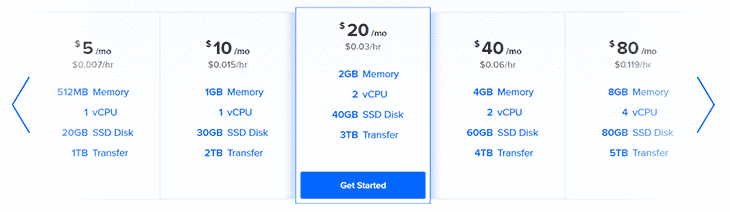
When evaluating options, the first pleasant surprise is the simplicity of the compute units, which the provider calls Droplets.Instead of a confusing array of instance families with cryptic names, you choose between basic shared CPU instances and dedicated CPU options optimized for general purpose, memory-intensive,or CPU-heavy workloads. The pricing is straightforward: a basic shared CPU Droplet starts at a highly competitive $4 per month. This entry-level tier is ideal for low-traffic web servers, personal blogs, or staging environments where you do not need dedicated processing threads.For teams used to the volatile pricing models of larger clouds, where a sudden spike in traffic can trigger a massive bill,the flat-rate pricing and monthly caps offer immediate peace of mind.
Value changes when you look at the resourceallocations. A standard Droplet plan includes a set amount of memory, storage, and a generous outbound bandwidth allowance. For example, a $6.00per month Droplet includes 1GB of memory, 25GB of SSD storage, and 1,000 GiB of outboundbandwidth. Inbound bandwidth is always free, which is a major advantage for data-heavy applications. The pricing question is how this compares to the major hyperscalers. Competitors often charge separately for compute, storage, and every gigabyte of data that leaves their network. By bundling these resources into a single, flatmonthly rate, the provider eliminates the guesswork from infrastructure budgeting. This predictability is a key reason why startups and independent developers choose to deploy their applicationshere.
However, the simplicity of the entry-level pricing can be deceptive if you donot plan for growth. While a $4 Droplet is excellent for a proof of concept, a production application will quicklyoutgrow its limited resources. As you scale to larger instances, the price gap between DigitalOcean and the major clouds narrows, thoughDigitalOcean generally remains more affordable for comparable resources. The key is to evaluate your resource usage patterns. If your workload is highly variableand requires complex, proprietary cloud services like managed machine learning pipelines or global database replication, a hyperscaler might still be necessary. But for standard web applications, APIs, and microservices, the straightforward Droplet model offers a compelling exit strategy fromthe hyperscaler tax.
Kubernetes and Container Orchestration
As applications grow, managing individual virtual machines becomesinefficient. Teams look to containerization to simplify deployments and improve resource utilization. However, running Kubernetes on major cloud platforms canbe prohibitively expensive, with competitors charging an hourly fee just to run the control plane, in addition to the costs of the worker nodes, storage, and bandwidth. The first bill is only part of the story; the ongoing management costs can quickly overwhelm a small team.
This is where the platform’s managed Kubernetes service (DOKS) becomes a compelling option. The provider offers a free high-availabilitycontrol plane, meaning you only pay for the underlying worker nodes and storage you consume. This can save a team significantmoney each month, making container orchestration accessible to early-stage startups. The service also includes features like autoscaling and advanced scheduling,allowing your infrastructure to adapt to traffic spikes automatically. By removing the financial barrier of the control plane and simplifying the cluster management interface,the platform allows developers to focus on writing containerized code rather than managing complex orchestration systems.
Furthermore, the integration between DOKS and other platform services is seamless. You can easily attach Block Storage volumes to your podsfor persistent data, or route incoming traffic using managed Load Balancers. The platform also supports GPU-powered environments within Kubernetes, makingit a viable option for startups running machine learning inference or data-intensive processing jobs. While it may lack some of the highlyspecialized configuration options found in enterprise-grade Kubernetes services, the simplicity and cost savings of DOKS make it an attractivechoice for teams that want to run containers without the administrative overhead.
Global Infrastructure and Performance Guarantees
A clean interface is worthless if the servers are slow or unreliable. When evaluating a cloud provider,you must look at the physical infrastructure and the service level agreements that back it. The platform operates 20 data centers distributed across 11 global regions, including key locations like New York, Atlanta, Toronto, and Amsterdam. This global footprint allows you to place your compute resources close to your targetaudience, which is the most effective way to minimize latency and improve page load times.
The reliability of these data centers isbacked by clear uptime SLAs. Standard Droplets and Block Storage volumes are backed by a 99.99% uptimeSLA, while the high-availability Kubernetes control plane carries a 99.95% uptime SLA. For specialized workloads, such as AI training or high-performancecomputing, the provider offers GPU Droplets backed by a 99.5% uptime SLA. These guarantees are critical for businesses running production workloads.If the platform fails to meet these uptime targets, you are credited for the downtime, providing a layer of financial protection. The physical hardware utilizes both air-cooled andliquid-cooled systems, connected by a high-speed 400G RoCE fabric to ensure rapid internal data transfer, which is essential for data-intensive applications like machine learning inference or real-time data processing.
Real-World Evaluation: Howthe Platform Handles Production Workloads
Deploying a staging server is one thing, but running a productionenvironment that handles thousands of concurrent users is where a cloud provider’s true capabilities are tested. In this section, we evaluate howthe platform performs under real-world conditions, focusing on compute performance, storage latency, and the developer experience of managing alive application stack. We look at the trade-offs between raw virtual machines and managed platform-as-a-service options,helping you determine the best architectural path for your project.
For teams that want tobypass server administration entirely, the App Platform PaaS offers a fully managed environment. You can deploy web applications, APIs, and static sites directly from your GitHub orGitLab repositories. The platform automatically handles provisioning, security patching, and scaling, allowing your developers to focus entirely on writing code. Thismodel is highly efficient for small teams that do not have a dedicated DevOps engineer. However, the convenience of a PaaS comes withresource limitations. The basic container plans have strict memory and CPU allocations, and scaling horizontally can quickly increase your monthly costs. If yourapplication requires custom system libraries or complex background processes, the structured environment of the App Platform may feel restrictive, forcing you backto raw Droplets.
When running databases, the platform’s Managed Databases service providesa worry-free alternative to self-hosting. You can deploy fully managed clusters for PostgreSQL, MySQL, MongoDB, Valkey, and Redis. The service handles automated daily backups, security patches, and failover replication, ensuring your data remains safeand accessible. The performance of these managed databases is solid, utilizing fast NVMe storage to deliver low-latency queries.However, the pricing for managed databases is significantly higher than running the same database engine on a standard Droplet. You arepaying a premium for the convenience of managed operations, which is a trade-off that budget-conscious startups must carefully evaluate.
For data-intensive workloads, the platform’s storage options are critical. Youcan choose between Block Storage volumes, which function as local hard drives attached to your Droplets, and Spaces Object Storage, whichis an S3-compatible service for storing unstructured data like images and videos. Spaces includes a built-in CDN atno extra cost, which helps reduce page load times by caching assets closer to your users. The performance of Spaces is reliable, maxing out at 1,500 requests per second per client IP address. However, if your application requires extremelyhigh write throughput or complex file system operations, object storage may introduce latency bottlenecks, making high-performance Block Storage the better, though more expensive, choice.
The Final Decision: Calculating the Real Cost of Droplets
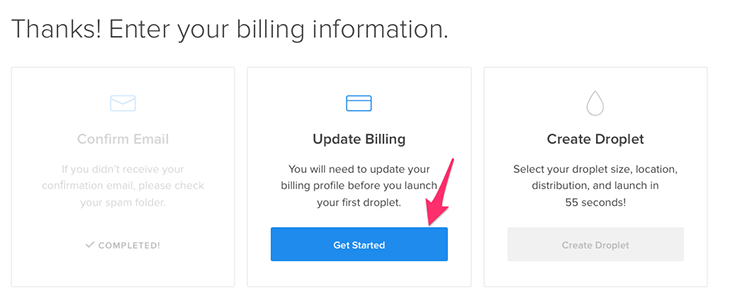
The moment of truth arrives when you enter your credit card details and prepare to launch your production stack.The initial appeal of cheap hosting can quickly fade if you do not account for the hidden costs and billing caveats that apply as you scale. To separate cheap from goodvalue, you must look past the entry-level compute prices and calculate the total cost of ownership, including backups, storage, load balancers, andsupport. The pricing question is whether the platform remains cost-effective once you add the necessary tools to run a secure, production-ready application.
The Mechanics of Per-Second Billing
A major factor in the final decision is how the platformcalculates usage. Effective January 1, 2026, the provider is moving to a per-second billing modelfor Droplets, replacing the older hourly billing system. This model features a minimum charge of 60 seconds (or$0.01, whichever is higher) and a monthly cap. For developers running short-lived workloads, such as CI/CD pipelines, automated testing suites, orbatch processing jobs, this change represents a significant opportunity to save money. You only pay for the exact seconds your virtual machine is running,rather than being billed for a full hour for a job that takes only a few minutes.
However, this billing model requirescareful resource management. If you spin up a high-performance Droplet for a quick test and forget to destroy it, the billing continues until the resource isexplicitly deleted. Because the platform enforces a strict no-refund policy, a simple oversight can lead to an unexpected charge atthe end of the month. The support team will not issue refunds for resources that were left running, making it essential to automate the destruction of temporarytesting environments using tools like Terraform or the platform’s API.
The Hidden Surcharges of Production Stacks
While a basic Droplet is inexpensive, a production-ready application requires more than just raw compute. You need backups to protect against data loss, blockstorage for persistent databases, load balancers to distribute traffic, and monitoring tools to track performance. These add-ons are billed separately and can quicklyincrease your monthly invoice.
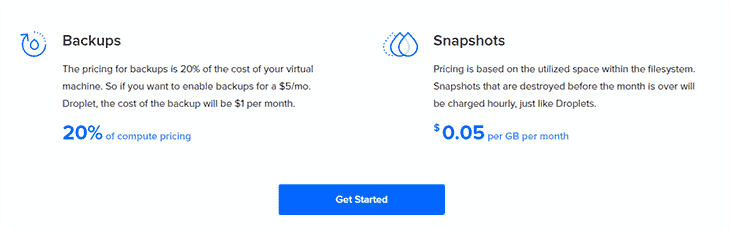
The first major add-on to consider is automated backups. The provider offers weekly backups, whichare disk images of your Droplets created automatically. However, this service is not free; it adds a mandatory 20% surcharge to the base cost of your Droplet. For a $4.00 Droplet, the backup cost is negligible, but for larger, dedicated CPUinstances, this 20% fee becomes a significant line item. If you need more frequent backups, you must look to third-party tools or manage them manually, whichadds administrative overhead.
Additional storage and networking resources also carry flat monthly rates. High-performance Block Storage volumes start at $10 per month, which isnecessary if your database outgrows the local SSD storage included in your Droplet plan. Load Balancers start at $12 permonth per node, which is essential for distributing traffic across multiple compute instances to ensure high availability. For monitoring, the platform allowsyou to track one endpoint for free, but charges $1 per month for each additional monitor. While these prices are transparent and predictable,they must be factored into your initial budget calculations to avoid surprises.
Managed Hosting and the Cloudways Alternative
For developers who want the performance of cloud infrastructure but do not want the hassle of managing servers, the platform offers a managed alternative through itsCloudways integration. Managed Cloud Hosting starts at $14 per month and includes server management, security updates, one-click application deployment, abuilt-in CDN, and advanced caching tools like Redis and Varnish.
This managed option is particularly appealing for agenciesand e-commerce businesses running WordPress or PHP-based applications. It abstracts away the complexity of command-line administration, server patching, and manual securityconfigurations. To help you evaluate this option, Cloudways offers a 3-day free trial with no credit card required. This allows you to test the deployment process, measuresite performance, and evaluate the custom control panel before committing your hosting budget. While the managed plans are more expensive than raw Droplets,the value of saved developer time and reduced sysadmin burden often makes it the more economical choice for growing businesses.
Value Methodology: How We Evaluate Cloud Infrastructure
To provide an objective assessment of DigitalOcean’s value, ourmethodology focuses on the total cost of running a standard production stack over a 12-month period. We do not lookat compute prices in isolation. Instead, we calculate a “Production Baseline” that includes one primary application server, a managed database node, automated weekly backups, a load balancer, and 500 GB of object storage. By comparing this baseline costagainst similar configurations on both hyperscalers and budget VPS providers, we can determine the true value-for-money score.
Our analysis shows that for small to medium workloads, DigitalOcean offers a significant cost advantageover AWS and Azure, primarily due to lower bandwidth costs and the free Kubernetes control plane. However, when compared to budget-focused VPS hosts, DigitalOcean’s add-on fees (like the 20% backup surcharge and database premiums) make it slightly more expensive. The value lies in the developer ecosystem: the robust API, the quality of the documentation, and the speedof resource provisioning. If your team can leverage these tools to build faster, the slight price premium over budget hosts is easilyjustified. But if you only need a single, static virtual machine with no scaling requirements, cheaper alternatives will save you money.
Ultimately, the decision to choose this platform depends on your team’s technical expertise and budget flexibility. If you have the skillsto manage unmanaged Linux servers and want predictable, flat-rate compute with generous bandwidth, raw Droplets offer exceptional value.However, you must budget for the 20% backup surcharge and accept the strict no-refund policy. If you prefer a hands-off approach, the managed Cloudways integration provides a secure, high-performance environment, albeit at a higher starting price. By calculating these trade-offs before you deploy, you can ensure your cloud infrastructureremains both stable and affordable.