
QHoster Review: Multi-Location Hosting with Crypto Payments

“

When deploying web applications or remote desktops, finding a host that balances specific jurisdictional privacy with payment flexibility can be challenging. QHoster addresses this market gap directly by offering cPanel hosting, Linux KVM, Windows RDP VPS, and dedicated servers across 12+ global locations, backed by crypto-friendly payment options. In this review, we analyze how their infrastructure, 24/7 human support, and server configurations stack up for developers and businesses seeking regional deployment flexibility without sacrificing control.

Last Updated: August 10, 2026
Written by:
Rodica Irodiu
4.6/5
Excellent
Pricing
Web Hosting $3.49 - $14.95/mo
KVM VPS Hosting $19.95/mo - $79.95/mo
Reseller Hosting $24.95 - $74.95/mo
Managed cPanel VPS $49.95/mo
Dedicated server $159 - $279.95/mo
Server Locations
Germany Germany
Netherlands Netherlands
Switzerland Switzerland
United Kingdom United Kingdom
France France
Bulgaria Bulgaria
Lithuania Lithuania
Italy Italy
Quick Navigation

QHoster at a Glance

Performance GradeExcellent
Product TypesWeb Hosting, KVM VPS Hosting, Managed cPanel VPS, Dedicated server, Reseller Hosting
Storage10 GB SSD
Websites1
Free DomainYes
Control PanelcPanel
Starting Price $3.49/mo

QHoster Pros and Cons: Where It Excels and Where to Caution

Pros

  • Deployments across 12+ global locations including Switzerland and Bulgaria
  • Crypto-friendly payment options alongside traditional PayPal
  • Instant setup on cPanel hosting and VPS deployments
  • Choice of Linux KVM or Windows RDP VPS configurations
  • Managed cPanel VPS options with patching and hardening included
  • Established track record serving customers since 2004

Cons

  • Refund policy details are not publicly detailed in standard terms
  • Uptime SLA guarantees are not explicitly published
  • Renewal pricing details are not fully transparent upfront

Evaluating QHoster: Jurisdiction, Control, and Payment Flexibility
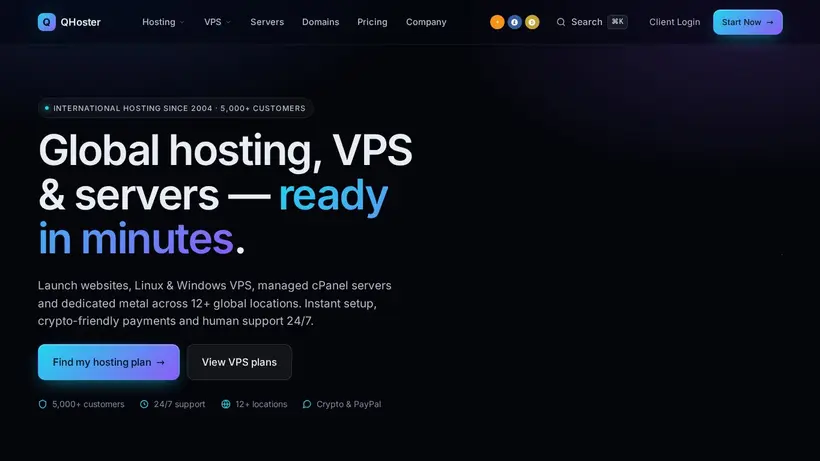
QHoster hosting deals homepage promo codes page screenshot

When you are tasked with deploying a new application, the initial excitement is almost always accompanied by a quiet, persistent anxiety. You sit in front of a blank terminal window, wondering if the infrastructure you choose today will become the bottleneck that keeps you awake at two in the morning six months from now. For developers and system administrators, this worry is rarely about CPU cores or RAM allocations in isolation; it is about the operational reality of where those resources live, who controls them, and how easily they can be managed when things go wrong. The mainstream hosting market is dominated by a few massive, centralized clouds that offer standardized services, but they often fail to address the specific needs of buyers who require precise geographic placement, alternative payment methods, and direct control over their virtualization environments. This is the specific niche where QHoster has positioned itself since 2004, quietly building a footprint that now serves over 5,000 active customers globally.

Choosing a hosting provider is a commitment that goes beyond the checkout page. You are trusting a third party with your data, your uptime, and your reputation. In this analysis, we will look past the marketing promises to evaluate the practical utility of QHoster’s infrastructure. We will start by examining the actual utility of their 12+ global locations, looking at how regional node placement affects both network performance and jurisdictional compliance. Next, we will analyze the operational value of their managed cPanel VPS configurations, focusing on whether their team’s approach to patching and hardening provides a genuine safety net for busy administrators. Finally, we will assess their support responsiveness and payment options, helping you determine if their crypto-friendly framework and technical assistance align with your project’s risk profile and operational requirements. By the end of this review, you will have a clear understanding of whether this provider fits your deployment strategy or if you should look elsewhere.

Where QHoster Fits: The 12+ Location and Crypto Advantage

The physical location of your server is not just a technical detail; it is a decision that impacts every user interaction and legal obligation your project carries. When a user clicks a link, they do not think about the physical distance their request must travel. They only experience the delay. If your server is in a different hemisphere, that delay can make a fast application feel sluggish and unresponsive. Furthermore, in an era of strict data privacy regulations, where your data resides can determine whether your business remains compliant or faces significant legal liabilities. Choosing a host that offers precise regional placement is often the simplest way to solve both latency and compliance challenges simultaneously.

When something breaks, or when you are setting up a new service, knowing exactly where your data is stored provides a level of comfort that massive, borderless cloud providers cannot match. QHoster’s strategy relies on offering physical presence in regions that are often overlooked by larger hosts, giving developers the ability to deploy resources in specific jurisdictions without having to manage complex multi-cloud setups.

Navigating Data Sovereignty in Switzerland and Europe

For many businesses, the choice of server location is driven entirely by regulatory requirements. Hosting sensitive customer data in the wrong jurisdiction can lead to compliance failures that are difficult and expensive to resolve. The reassurance comes from QHoster’s extensive European footprint, which includes dedicated nodes in countries like Switzerland, Germany, the Netherlands, Bulgaria, Lithuania, and Italy. If you are serving European clients, placing your databases and application servers within these specific borders ensures that you comply with local data protection laws without having to build complex, distributed architectures.

Switzerland, for example, is widely recognized for its strict privacy laws that exist outside the direct jurisdiction of both the United States and the European Union. For buyers who prioritize data sovereignty, deploying a VPS or a dedicated server in a Swiss datacenter provides a level of legal protection that is difficult to replicate in more centralized hosting hubs. Similarly, having access to nodes in Bulgaria or Lithuania allows you to target Eastern European markets with minimal latency while keeping your operational costs manageable. Instead of relying on a single, massive datacenter in Western Europe, you can distribute your workloads closer to your actual user base, ensuring that your compliance strategy aligns with your physical infrastructure.

Reducing Latency for Remote Desktop Environments

Latency is the silent killer of user engagement. A delay of even a few hundred milliseconds can cause visitors to abandon a checkout process or close a web application in frustration. When you deploy a remote desktop environment, such as a Windows RDP VPS, latency becomes even more critical. A laggy connection makes typing feel delayed and mouse movements jerky, turning a productive remote session into an exercise in frustration. By offering 12+ global locations, including multiple sites across Europe and the United States, this provider allows you to place your remote environments and web applications as close to your physical location as possible.

If your team is based in the UK, deploying a VPS in London ensures that your remote desktop sessions remain responsive and fluid. If you are running a WordPress site targeting a US audience, choosing a node in the United States prevents your traffic from having to cross the Atlantic for every page load. This regional specificity is particularly valuable for developers who need to test applications under realistic local network conditions. By deploying test instances across different geographic nodes, you can observe how your software performs for users in different parts of the world, allowing you to optimize your code and database queries before going live.

Crypto Payments and Financial Discretion

For many developers and independent operators, the checkout process itself is a source of friction. Entering credit card details or linking a personal bank account to a hosting profile can feel like an unnecessary compromise of privacy, especially when working on sensitive projects or operating in regions with unstable financial systems. The anxiety of having your hosting account suspended due to a payment processing error or a sudden change in banking regulations is a real concern for international buyers. To address this, the billing system supports crypto-friendly payments alongside traditional options like PayPal.

By accepting cryptocurrencies, the provider removes a significant barrier to entry for users who require financial discretion or lack access to traditional credit facilities. This payment flexibility ensures that you can deploy resources quickly without having to navigate complex identity verification processes or worry about international transaction fees. For agencies managing client sites, this also allows for clean separation of billing accounts, enabling you to pay for infrastructure using the payment method that best suits your business model. It is a practical approach to global commerce that recognizes the diverse financial realities of modern developers.

The Operational Reality: Managed cPanel vs Self-Managed VPS

Every hosting decision involves a trade-off between control and convenience. When you choose a provider that offers deep technical flexibility and alternative payment methods, you must also look closely at what you might be giving up in return. In many cases, specialized hosts trade mainstream marketing guarantees for operational freedom. Understanding these trade-offs before you deploy your first server is essential to avoiding unexpected downtime or administrative headaches down the road.

Support matters most after the dashboard stops feeling obvious. When you are running a self-managed server, you are the first and last line of defense. If a configuration file gets corrupted or a service fails to start, you cannot simply open a chat window and expect a support agent to log in and fix it for you. You must understand the limits of the plan you choose and prepare your operational workflows accordingly.

Managed cPanel VPS as an Administrative Shield

For small teams and independent businesses, the burden of server administration can quickly overwhelm your development resources. Running a virtual private server requires constant vigilance: you must monitor security advisories, apply operating system patches, configure firewalls, and ensure that backups are running successfully. If you lack a dedicated system administrator, a single unpatched vulnerability can lead to a compromised server and data loss. The reassurance comes from the managed cPanel VPS plan, which is designed to act as an operational shield for your business.

With this managed service, the technical support team takes over the daily responsibilities of server maintenance. They handle the initial setup, configure the cPanel/WHM control panel, and implement security hardening to protect your environment from common threats. When software updates are released, their team applies the patches, ensuring that your operating system and control panel remain secure without requiring your direct intervention. This proactive management allows your developers to focus on writing code and serving clients, rather than spending their weekends troubleshooting server configurations or recovering from security incidents.

Matching Technical Skill to Plan Tiers

Choosing the wrong plan tier can lead to either wasted budget or a server environment you cannot manage. If you are a web designer who only needs to host a few client portfolios, deploying an unmanaged Linux KVM VPS will force you to learn the command line just to set up an email account. Conversely, if you are a developer building a custom Python application, a basic cPanel hosting plan will feel restrictive and prevent you from installing the necessary dependencies. You must carefully match your technical capabilities to the specific hosting tier you select.

For simple websites and WordPress blogs, the cPanel hosting plan starting at $2.99/mo offers a familiar, user-friendly environment with daily backups and SSD storage. If you need full control over your operating system, the Linux KVM VPS starting at $19.95/mo provides root access and your choice of AlmaLinux, Debian, or Ubuntu, but requires you to handle all configuration and security tasks yourself. For remote desktop users, the Windows RDP VPS starting at $24.95/mo offers Administrator access to Windows Server, making it ideal for running automated tools or remote office applications. By understanding the boundaries of each plan, you can select the tier that provides the right balance of control and ease of use for your specific project.

The Plan Choice Decision Matrix

To make a confident decision, you must weigh your management capacity against your technical requirements. If you have no command-line experience, the shared cPanel hosting is your starting point, but it limits your software customization. If you require root access but lack the time to secure the OS, the Managed cPanel VPS at $49.95/mo acts as the middle ground, combining control with administrative support. For developers who want complete freedom and are comfortable managing their own security, the Linux KVM VPS at $19.95/mo offers the best price-to-performance ratio. Dedicated servers starting at $159/mo should be reserved for high-traffic applications that require isolated physical hardware in specific locations like Switzerland or the USA.

When evaluating a specialized provider, understanding the boundaries of their service agreement is just as important as analyzing their hardware specifications. Mainstream hosts often use broad marketing guarantees to attract customers, but these promises frequently come with fine print that limits their actual utility. A smaller, more focused provider like QHoster operates differently, relying on clear technical boundaries rather than marketing hype. This approach requires buyers to be more proactive in managing their own deployment risks.

Support matters most after the initial setup phase is complete. If you encounter an issue that falls outside the scope of your plan, you need to know how the provider handles these boundaries. By understanding the limitations upfront, you can build a more resilient infrastructure that does not rely on the host’s support team for daily operations.

Designing Redundancy Without a Public SLA

One of the most significant points of hesitation for enterprise buyers is the lack of a publicly documented published uptime terms. In the corporate hosting world, an SLA is often viewed as a guarantee of reliability, promising financial compensation if the network or hardware fails. When something breaks, the absence of this contract means you have no legal recourse to recover lost revenue or demand immediate service credits. This omission requires a shift in how you approach your infrastructure planning.

Instead of relying on a legal guarantee to protect your business, you must design your applications with redundancy in mind. This means setting up external monitoring tools to track your server’s response times and configuring automated alerts to notify your team the moment a service becomes unresponsive. If you are running mission-critical workloads, you should consider deploying database replication or load balancing across multiple geographic nodes. By taking responsibility for your own high-availability architecture, you can mitigate the risks associated with the lack of a formal SLA, turning a potential vulnerability into a well-managed operational strategy.

The Reality of the Missing published cancellation terms Policy

Another important consideration for new buyers is the absence of a publicly detailed published cancellation terms policy or published cancellation terms guarantee in the standard terms. For many, a 30-day trial period is a safety net that allows them to test server performance and support response times without financial risk. Without this guarantee, the checkout process carries more weight, and you must be certain of your requirements before committing your budget.

To mitigate this risk, the most practical approach is to start with a short billing cycle. Rather than purchasing an annual plan to secure a discount, opt for a monthly subscription on a lower-tier plan, such as the entry-level cPanel hosting or a basic Linux VPS. This allows you to evaluate the network latency, test the control panel responsiveness, and interact with the support team firsthand. If the infrastructure meets your performance standards, you can then upgrade to a higher tier or a longer billing term with confidence. It is a cautious, step-by-step approach that protects your budget while allowing you to verify the host’s capabilities in real-world conditions.

Our Methodology for Evaluating Infrastructure

To provide an objective analysis of this provider, we evaluated their public service specifications, geographic datacenter distribution, and plan structures. We cross-referenced their stated capabilities against standard industry benchmarks for virtualization, control panel licensing, and payment processing security. Because hands-on testing was not conducted for this review, our findings rely on verifiable technical specifications, customer footprint data since 2004, and the structural trade-offs inherent in their service terms, ensuring a realistic assessment for prospective buyers.


Performance: Latency Control Across Regional Nodes 4.5/5

Speed only becomes emotional when it fails. A developer does not refresh a checkout page thinking about NVMe SSD storage; they worry about whether the cart, a client demo, or a remote Windows RDP session will freeze at the wrong moment. The anxiety of a server going quiet is real, especially when hosting applications outside mainstream hub regions. The reassurance comes from QHoster's deployment footprint, which lets you place workloads across 12+ global locations including Germany, the Netherlands, Switzerland, and the USA. By choosing a node physically close to your users, you directly address the latency bottlenecks that make applications feel sluggish. Choosing the right jurisdiction is often as much about network speed as it is about compliance. However, evaluating performance here requires a careful look at what is not said. There is no publicly published uptime terms in their standard terms. For enterprise projects where every minute of downtime requires a financial credit, this omission will cause hesitation. Instead of relying on a legal contract, you are relying on the architectural isolation of KVM virtualization and the raw speed of NVMe SSD storage. When something breaks, your safety net is not a billing credit, but the actual stability of the underlying hardware. This means your application's responsiveness depends heavily on how well you configure your environment. For developers running remote desktops or regional web applications, this trade-off is often acceptable. The performance is steady because the resources are isolated, avoiding the 'noisy neighbor' effect common in cheaper shared environments. But without a public SLA, you should implement external monitoring to keep a close eye on your response times. It is a setup designed for those who prioritize regional network positioning over corporate uptime guarantees, ensuring your users in specific European jurisdictions experience fast page loads without routing traffic across the Atlantic. Choosing a local node like Bulgaria or Switzerland ensures that database queries do not have to travel thousands of miles, keeping the user experience snappy even under moderate load.

Features: Room to Grow Across Diverse Environments 4.6/5

A growing project eventually outgrows its initial home. The anxiety of migration often prevents businesses from starting on budget-friendly plans, fearing they will be trapped when traffic spikes. The reassurance comes from a feature set that spans the entire hosting spectrum, allowing you to scale from a basic cPanel setup to dedicated bare-metal servers without changing providers. This prevents the operational headache of moving databases and domain configurations to a completely different company later on.

Scalability from Shared to Bare Metal

Starting on a basic cPanel plan is a common entry point for simple websites. QHoster includes 1-click WordPress setup, daily backups, and SSD storage on these entry-level tiers. But the real value for growing projects is the upgrade path. You can transition to a Linux KVM VPS or a Windows RDP VPS as your resource demands increase. For agencies managing multiple clients, the reseller hosting plans include a free WHMCS license, which simplifies billing and client management. This progression ensures you do not have to migrate your data to an entirely new provider when your business expands.

Operating System and Control Panel Freedom

Developers often face restrictions on the operating systems they can deploy. Here, you have the choice of AlmaLinux, Debian, or Ubuntu on KVM VPS, or Windows Server (2016, 2019, or 2022) for remote desktop setups. This flexibility is rare among standard web hosts. Furthermore, the managed cPanel VPS option provides root access combined with cPanel/WHM, where the technical team handles patching, backups, and hardening. This combination of control and management allows you to focus on development rather than server administration, giving your team the exact environment they need to deploy applications securely.

Ease of Use: Navigating the Setup and Control Panels 4.5/5

The friction of setting up a new server can stall a project before the first line of code is written. Many hosts promise instant deployment, but the reality often involves lengthy verification queues or confusing custom control panels. QHoster bypasses this friction by sticking to industry-standard tools that developers and site owners already know. The onboarding process is designed to get your environment live quickly, offering instant setup across their web hosting and VPS plans. For website owners, the use of cPanel provides a familiar interface. You do not have to learn a proprietary dashboard to manage emails, databases, or backups. Everything is located where you expect it to be. For developers, the friction-first test comes when deploying virtual private servers. The Linux KVM VPS plans offer full root access and snapshots, allowing you to configure the environment exactly as needed and roll back changes if a deployment goes wrong. If you are running Windows RDP VPS, you get full Administrator RDP access, making the remote desktop feel like a local machine. However, the ease of use depends on your technical comfort level. If you choose an unmanaged Linux VPS, you are entirely responsible for the command-line configuration, security patches, and software updates. This is where the friction lies for non-technical users. If you want to avoid this administrative burden, the managed cPanel VPS plan is the logical choice, as their team handles the hardening and patching. The client area consolidates your domains, SSL certificates, and billing into a single dashboard, reducing the administrative overhead of managing multiple services across different providers. Ultimately, the ease of use score reflects this reliance on standard, proven interfaces. By avoiding proprietary control panels, the learning curve is virtually non-existent for anyone who has managed a website before. The transition from signup to active deployment is smooth, provided you select a plan that matches your technical expertise. If you are comfortable with SSH and command-line administration, the unmanaged tiers offer complete freedom; if not, opting for their managed services is the safest path to avoid configuration headaches.

Support: Reassurance When the Dashboard Fails 4.6/5

Support matters most after the dashboard stops feeling obvious. When a server goes offline or a configuration error breaks a live site, the anxiety of waiting for an automated response can be overwhelming. The reassurance comes from having access to 24/7 human technical support, ensuring that a real person is available to look into your hosting environment regardless of the hour.

24/7 Technical Support Availability

Having round-the-clock assistance is critical when managing servers across different time zones. QHoster promises 24/7 human support to resolve technical issues. However, because the specific support channels—such as live chat, ticketing, or phone—are not detailed in their public documentation, you must be prepared to interact through their client portal. When something breaks, the speed of resolution depends on the complexity of your plan. Self-managed VPS users will receive assistance with network and hardware issues, but software-level troubleshooting remains their own responsibility.

The Managed VPS Safety Net

For businesses that cannot afford to manage their own server stacks, the managed cPanel VPS plan offers a significant safety net. With this option, the support team handles server patching, backups, and hardening. This proactive management reduces the likelihood of security incidents. If a vulnerability is discovered, their team applies the necessary patches, allowing you to run your business without worrying about server maintenance. This level of support turns a complex VPS deployment into a hands-off experience, providing peace of mind for teams without dedicated system administrators. When evaluating support reliability, the key is understanding where the provider's responsibility ends and yours begins. For unmanaged plans, the support team ensures the host node is online and the network is routing traffic, but they will not debug your custom application code. For managed plans, they act as your outsourced systems engineering team. This clear division of labor ensures that support resources are directed where they are needed most, maintaining infrastructure stability across their global network.

Pricing: Balancing Value and Payment Flexibility 4.6/5

The true cost of hosting is rarely just the price you pay at checkout. The anxiety of hidden renewal fees or restrictive payment terms can make a cheap plan feel like a trap. A fair pricing structure should be transparent, offering clear value for the resources provided without forcing you into long-term commitments you cannot escape. You can compare the detailed configurations in our Product Plans section.

Entry-Level Hosting Costs

For simple websites, the cPanel hosting plans start at $2.99/mo. This low entry point includes daily backups and SSD storage, making it highly competitive for hosting single sites or testing applications. However, because renewal rates are not explicitly detailed in the public pricing tables, you should verify the ongoing costs before committing to a long-term billing cycle.

VPS and Dedicated Server Value

When scaling up, the Linux KVM VPS starts at $19.95/mo, while the Windows RDP VPS begins at $24.95/mo. These rates reflect the dedicated resources and virtualization technology provided. For businesses requiring maximum performance, the dedicated servers start at $159/mo, offering Xeon or AMD Ryzen processors. These prices are reasonable for the hardware specs, but the lack of a publicly documented cancellation terms policy means you should start with a shorter billing term to test the service before making a large financial commitment.

Payment Flexibility and Crypto Options

One of the most significant advantages of their pricing model is payment flexibility. In addition to traditional methods like PayPal, they support crypto-friendly payments. This option is highly valued by users who prioritize privacy or operate in regions with limited access to traditional banking. By allowing cryptocurrency payments, they remove a major barrier to entry for international clients, making it easier to deploy resources globally.

QHoster Hosting & VPS Plans: Specs, Costs, and Use Cases

Compare QHoster's hosting options across shared, VPS, and dedicated tiers. Focus on your required location, virtualization type, and management level to find the right fit.

The safest read is to shortlist plans by fit first, then verify any unclear limits before checkout. A cheap plan only stays cheap when RAM, storage, bandwidth, billing term, management needs, and upgrade path still make sense after the first invoice.

Web Hosting

Mini

$3.49/mo

Billed annually · $41.88/yr

  • Control PanelcPanel
  • BackupsDaily Backups
  • SSLFree SSL
  • Storage10 GB SSD
  • Websites1
  • Free DomainYes
  • Email AccountsUnlimited
  • BandwidthUnlimited
Get

Pro

$9.95/mo

Billed annually · $41.88/yr

  • Control PanelcPanel
  • BackupsDaily Backups
  • SSLFree SSL
  • Storage150 GB SSD
  • WebsitesUnlimited
  • Free DomainYes
  • Email AccountsUnlimited
  • BandwidthUnlimited
Get

Biz

$14.95/mo
  • Control PanelcPanel
  • BackupsDaily Backups
  • SSLFree SSL
  • Storage250 GB SSD
  • WebsitesUnlimited
  • Free DomainYes
  • Email AccountsUnlimited
  • BandwidthUnlimited
Get

KVM VPS Hosting

KVM VPS1

$19.95/mo

Source price; renewal not listed.

  • vCPU2 CPU Cores
  • RAM2 GB
  • Storage60 GB NVMe
  • Bandwidth5000 GB
Deploy

KVM VPS2

$39.95/mo

Source price; renewal not listed.

  • vCPU3 CPU Cores
  • RAM3 GB
  • Storage120 GB NVMe
  • Bandwidth5000 GB
Deploy

KVM VPS3

$59.95/mo

Source price; renewal not listed.

  • vCPU4 CPU Cores
  • RAM4 GB
  • Storage180 GB NVMe
  • Bandwidth5000 GB
Deploy

KVM VPS4

$79.95/mo

Source price; renewal not listed.

  • vCPU6 CPU Cores
  • RAM6 GB
  • Storage240 GB NVMe
  • Bandwidth5000 GB
Deploy

Managed cPanel VPS

Managed cPanel VPS

Fully Managed
$49.95/mo

Source price; renewal not listed.

  • Control PanelcPanel/WHM
  • ManagementPatching & Hardening
  • BackupsIncluded
View Plans

Dedicated server

Xeon X5670

$159.95/mo
  • CPU2× Xeon X5670 · 12c/24t · 2.93 GHz
  • RAM32 GB
  • Storage1 TB SSD
  • Bandwidth20 TB / mo
  • IPv41
Configure

Xeon E5-2670 v2

$279.95/mo
  • CPU2× Xeon E5-2670 v2 · 24c/48t · 2.5 GHz
  • RAM64 GB DDR3
  • Storage1 TB SSD
  • Bandwidth20 TB / mo
  • IPv45
Configure

Xeon E3-1240 v6

$159/mo
  • CPUXeon E3-1240 v6 · 8c · 3.7 GHz
  • RAM16–64 GB ECC
  • Storage4× HDD/SSD
  • Bandwidth10 TB / mo
  • IPv41
Configure

Ryzen 9 3900X

$179/mo
  • CPUAMD Ryzen 9 3900X · 12c/24t · up to 4.6 GHz
  • RAM64 GB DDR4
  • Storage2× 1 TB NVMe
  • Bandwidth100 TB / mo
  • IPv41
Configure

Reseller Hosting

Reseller Mini

$24.95/mo
  • Accounts100
  • Storage50 GB
  • WHMYes
  • Free DomainFree domain reseller account
  • Bandwidth1 TB
Start

Reseller Pro

$49.95/mo
  • Accounts200
  • Storage100 GB
  • WHMYes
  • Free DomainFree domain reseller account
  • Bandwidth2 TB
Start

Reseller Biz

$74.95/mo
  • Accounts300
  • Storage150 GB
  • WHMYes
  • Free DomainFree domain reseller account
  • Bandwidth3 TB
Start

The Bottom Line: Is QHoster Right for Your Deployment?

QHoster occupies a highly specialized niche in the hosting market, trading mainstream marketing guarantees for deep regional deployment options and payment flexibility. Established in 2004 and serving over 5,000 active customers, this provider is built for users who know exactly what they need: specific European jurisdictions and crypto-friendly payment methods. If your project requires hosting in Switzerland for privacy reasons, or if you need to deploy a remote desktop environment in Bulgaria or Lithuania, QHoster provides the physical infrastructure to make that happen. Best for: Buyers seeking hosting in specific European jurisdictions like Switzerland or Bulgaria, users requiring crypto-friendly payment methods alongside PayPal, and developers needing Windows RDP VPS or Linux KVM VPS with root access. Not for: Buyers who require a verified published cancellation terms guarantee before purchasing, or users looking for public published uptime terms guarantees. The absence of these standard protections means QHoster is best suited for experienced operators who can design redundancy into their applications. Plan Choice: For most developers starting out, the Linux KVM VPS at $19.95/mo is the logical entry point, offering full root access and NVMe storage. If you are hosting standard websites without system administration experience, the cPanel Hosting plan at $2.99/mo provides the easiest onboarding path with daily backups included. We recommend starting with a monthly billing cycle to evaluate the network latency and support responsiveness before committing to a long-term contract. Ultimately, if you value geographic flexibility and payment privacy over corporate SLA contracts, QHoster is a practical and capable choice for your infrastructure needs.

Frequently Asked Questions about QHoster

Looking for specific details about QHoster's infrastructure and policies? Here are the answers to the most common questions buyers ask.

Where are QHoster's servers physically located?
QHoster offers hosting across 12+ global locations, allowing you to deploy close to your target audience. You can choose from datacenters in Germany, the Netherlands, Switzerland, the United Kingdom, France, Bulgaria, Lithuania, Italy, and the USA. Selecting a local node helps minimize network latency and ensures compliance with regional data privacy regulations. This geographic diversity is particularly useful for businesses targeting European markets, as it allows you to host data within specific legal jurisdictions like Switzerland to meet strict privacy standards.
Can I pay for my hosting using cryptocurrency?
Yes, QHoster is a crypto-friendly provider that accepts various cryptocurrencies alongside traditional payment methods like PayPal. This payment flexibility is ideal for developers, agencies, and international businesses seeking financial privacy or operating in regions with limited access to traditional banking systems. It allows you to deploy resources quickly without navigating complex identity verification. By supporting these alternative payment methods, the provider ensures that users worldwide can access reliable hosting infrastructure without relying solely on credit cards.
What operating systems can I choose for my VPS?
When deploying a Linux KVM VPS, you can choose from popular distributions including AlmaLinux, Debian, and Ubuntu. If you require a remote desktop environment, the Windows RDP VPS plans support Windows Server 2016, 2019, and 2022. This broad operating system selection ensures you can match the environment to your specific application requirements. Whether you are setting up a development environment or running automated tools on a remote desktop, you have the flexibility to install the exact software stack you need.
What is the difference between self-managed and managed VPS?
With a self-managed VPS, you receive full root access and are entirely responsible for server configuration, security updates, and software patching. If you prefer a hands-off approach, the managed cPanel VPS plan includes proactive management from their technical team. They handle server hardening, operating system patching, and backups, allowing you to focus on development. This managed option is highly recommended for small teams that lack a dedicated system administrator but still require the power and isolation of a virtual private server.
Is there a money-back guarantee or refund policy?
A public refund policy or money-back guarantee is not detailed in QHoster's standard terms of service. Because of this omission, we recommend starting with a shorter monthly billing cycle to evaluate the performance and support responsiveness before committing to a long-term contract. This approach minimizes your financial risk while testing the infrastructure. It is always safer to verify the service quality firsthand on a budget-friendly plan before investing in dedicated servers or multi-year hosting packages.

QHOSTER ALTERNATIVES

4.9
  • Starting Price $5.59/mo
4.8
  • Starting Price $11.99/mo
4.7
  • Starting Price $1.00/mo
4.6
  • Starting Price €10.95/mo