
StableHost Review: Familiar cPanel Tools, Important Checkout Questions

“

A WordPress site owner may want familiar controls without discovering costly surprises after checkout. This StableHost review examines how cPanel, one-click installation, developer tools, and around-the-clock technicians fit that need. StableHost also markets Shared, Enterprise, Reseller, and VPS hosting, giving growing buyers several possible paths. The attraction is practical; the unanswered questions matter too. We separate the published starting price and first-year promotion from missing plan prices, renewal terms, uptime commitments, server locations, and refund details so you know what to confirm before buying.

Last Updated: August 7, 2026
Written by:
John Fraskos
4.6/5
Excellent
Pricing
Reseller Hosting $ 11.65/mo - $ 34.97/mo
Dedicated Server $ 145/mo - $ 245/mo
Server Locations
Phoenix Phoenix
Chicago Chicago
Amsterdam Amsterdam
Quick Navigation

StableHost at a Glance

Performance GradeExcellent
Hosting TypesWeb Hosting, Reseller Hosting, VPS Hosting, Dedicated Server
Free SSLYes
Storage5GB
Websites1
Control PanelcPanel
Starting Price $2.11/mo

StableHost Strengths and Details to Confirm

Pros

  • cPanel supports familiar domain and email account management.
  • A one-click installer simplifies WordPress and other common-script setup.
  • Published developer tools cover several conventional web technologies.
  • StableHost markets Shared, Enterprise, Reseller, and VPS hosting families.
  • Enterprise-grade SSD hardware appears in the published infrastructure description.
  • StableHost publishes email and phone contact details for support.
  • Technicians are stated to be available around the clock.

Cons

  • Exact Starter and Pro prices and resource allocations are not published.
  • Renewal pricing, billing terms, and setup fees require confirmation before checkout.
  • No usable uptime commitment, refund window, or money-back guarantee is published.
  • Datacenter locations, migration terms, and advanced-plan specifications remain unclear.

Choosing cPanel Hosting for WordPress and Small Sites

StableHost hosting deals homepage promo codes page screenshot
A small-business owner preparing a WordPress launch usually wants a modest outcome: connect the domain, create branded email, install the site, then return to running the business. StableHost speaks directly to that buyer through cPanel, domain and email management, and one-click installation for WordPress and other common scripts. The relief is easy to understand. Familiar controls can make hosting feel like a manageable task rather than a new technical profession.

Then the checkout questions begin. StableHost publishes a general starting price of $4.95 per month and advertises 50% off the first year for Web Hosting Starter and Pro. Neither statement establishes the exact price of either plan, its billing term, the amount due at renewal, or possible setup fees. A buyer attracted by the promotion may therefore like the service concept while remaining unsure about the complete cost.

This StableHost review examines that tension instead of smoothing it over. The central question is whether familiar cPanel hosting, practical installation tools, documented developer technologies, and around-the-clock technicians provide enough value to justify a closer look. The answer depends on your workload and your willingness to confirm missing commercial and infrastructure details before paying.

The review follows a straightforward methodology. It evaluates only published product names, tools, technology claims, contact details, and commercial statements available for this review. It does not claim hands-on speed testing, uptime monitoring, migration testing, or support-response measurements. Hardware and network descriptions are treated as platform signals rather than proof of a particular site result. Missing plan limits, renewal terms, locations, uptime commitments, published cancellation terms conditions, and security provisions remain unanswered instead of being estimated.

That approach matters because StableHost presents several product families: Shared, Enterprise, Reseller, and VPS hosting. Breadth can reassure a buyer hoping to grow, but a product label alone does not explain resources, management responsibilities, or upgrade procedures. The useful task is to match documented capabilities to real buyers, compare Starter with Pro without inventing differences, then identify the questions that must be resolved at checkout.

Best for: WordPress beginners, conventional website owners, cPanel users, small teams managing domains and email, and developers whose projects use the published technology stack. Not for: buyers who must know exact renewal costs, datacenter geography, formal uptime terms, published cancellation terms conditions, or advanced-plan specifications before contacting the provider. The final recommendation is positive but conditional: StableHost looks practical when familiar administration matters, provided the unanswered terms are confirmed in writing.

StableHost hosting Review

Which StableHost Buyers Have a Clear Fit?

Imagine two people arriving at the same product page. One wants a new WordPress site for a local service business. The other needs a VPS with precisely defined resources, a particular operating system, a known datacenter, and formal availability terms. StableHost may interest both, but the published information supports a much clearer decision for the first buyer. Matching the service to the workload prevents a broad hosting catalog from creating false certainty.

The documented shared-hosting experience centers on recognizable tasks: managing domains and email through cPanel, installing popular scripts with one click, and working with a published list of common development technologies. StableHost also identifies Web Hosting Starter and Web Hosting Pro as separate plans. Exact prices, limits, and differences between those plans are not available, so choosing between them requires a direct conversation rather than guesswork.

WordPress Beginners Seeking a Simpler Launch

A first WordPress launch can feel surprisingly emotional. The owner may have already chosen a theme, written the home page, and promised customers a launch date. What causes hesitation is often the surrounding setup: domain records, databases, email accounts, and an unfamiliar dashboard. StableHost addresses part of that worry with cPanel and a one-click installer for WordPress, Joomla, and other popular scripts.

The practical advantage is a shorter route to routine setup. A buyer can approach domain management, email creation, and application installation through a conventional hosting interface. Someone who already knows cPanel receives a recognizable workflow. A newcomer still has concepts to learn, but the account does not depend entirely on a proprietary control system.

Consider a consultant launching a site with service pages, a contact form, branded email, and occasional articles. That workload does not inherently require a VPS or an undefined advanced tier. The documented shared-hosting tools align with the immediate job: establish the domain, create email accounts, install WordPress, then manage the site. In this scenario, StableHost has a credible use-case match.

The fair caveat is that one-click installation is not the same as managed WordPress service. It does not establish automatic updates, backups, malware handling, restoration terms, migration assistance, or ongoing application maintenance. A buyer expecting a fully managed experience should ask which WordPress tasks StableHost handles and which remain the customer’s responsibility.

A new site and an existing site also create different risks. A new installation can begin cleanly through the installer. A migration may involve files, databases, mailboxes, DNS changes, application compatibility, and possible interruption. Migration terms are not published here. Before moving a live site, ask whether migration is available, what it includes, whether it costs extra, and who handles each stage.

Starter and Pro should not be compared by their names alone. “Pro” may sound safer when a launch deadline is near, but no documented resource distinction supports that emotional upgrade. Describe the number of sites, domains, mailboxes, current storage, application type, and unusual requirements. Ask which plan fits and request its limits. Choose the smallest plan whose boundaries clearly cover the present workload.

This guidance avoids two mistakes: buying too little based only on an advertised opening price, or buying too much because a higher-tier name feels reassuring. StableHost remains appealing for straightforward WordPress setup, but confidence should come from a documented fit rather than the plan label.

Small Teams Managing Domains and Email

A small team often lacks a dedicated hosting administrator. The same person may update the website, create a mailbox for a new employee, manage a domain, and call support when an unfamiliar setting appears. For that buyer, organization matters. StableHost connects cPanel with domain and email account management, giving routine tasks a familiar home.

Centralized controls can reduce everyday confusion. A family business may need several branded addresses. A small agency may manage a project domain and temporary installation. A nonprofit may need volunteers to find familiar account tools months after launch. cPanel does not remove every technical decision, but it can make recurring administration easier to locate and repeat.

The limitation is capacity. Published domain and email management does not establish how many domains, mailboxes, databases, or installations a plan permits. It also does not identify mailbox storage, sending limits, filtering tools, or account separation. A team should avoid treating general management capabilities as proof that every desired account fits.

StableHost advertises unlimited bandwidth, which can sound reassuring to a growing organization. The safer interpretation is narrow: bandwidth is presented without a conventional fixed allowance in the available material. It does not establish unlimited CPU, memory, storage, database activity, concurrent processes, or every form of usage. Ask which resource policies apply to the selected plan and how sustained usage is handled.

Agencies may also notice Reseller hosting. That family could become relevant when client separation and repeatable account management matter. However, no detailed Reseller specifications are available here. Do not assume included account counts, isolation, branding, billing tools, management scope, or resource allocations. Ask what Reseller hosting adds compared with placing several projects in shared hosting.

The comparison is practical. Shared hosting appears aligned with one organization managing its own conventional sites and email. Reseller hosting may be relevant when managing separate client environments becomes a defined requirement. VPS hosting may matter when system-level control or separately specified resources are necessary. Enterprise hosting is another marketed path, but its role needs clarification. Choose the family that solves a present problem, not one that merely sounds expandable.

For small teams, StableHost’s appeal comes from familiar administration rather than published capacity detail. That can still be enough to start a useful pre-sale conversation. List the required domains, mailboxes, websites, and account-separation needs. If StableHost maps them clearly to Starter, Pro, or another family, the purchase becomes easier to defend.

Developers Using Conventional Web Technologies

Developers approach hosting with a different kind of anxiety. A plan can look suitable until an exact runtime, extension, access method, or resource rule blocks deployment. StableHost gives developers an initial compatibility map by publishing support for PHP 7.x and 8, MariaDB or MySQL, Perl, Python, Server Side Includes, and Git.

That list is useful because it replaces a vague “developer-friendly” impression with named technologies. A conventional PHP application using MariaDB or MySQL has an apparent place to begin. Git may support a more orderly code workflow. Python, Perl, and Server Side Includes broaden the range of projects worth discussing.

Named technologies are compatibility leads, not complete deployment specifications. The published list does not establish exact minor versions, extensions, database releases, shell access, scheduled tasks, process limits, deployment hooks, permissions, or custom service support. A developer should send the application requirements before ordering and request explicit confirmation of every mandatory dependency.

Picture a freelancer inheriting an established PHP site. The code runs on a known PHP branch and depends on several extensions. StableHost’s published PHP support makes the service relevant, but it does not settle whether the precise environment is available. Verification before migration is cheaper than discovering incompatibility after DNS changes begin.

VPS hosting introduces another comparison. A developer may associate VPS service with root access, selectable operating systems, isolated resources, or greater control. None of those attributes should be inferred here. VPS specifications, operating systems, resource allocations, management scope, and security responsibilities are not published in the review facts.

The right Shared-versus-VPS question is not “Which is more powerful?” It is “Which documented requirement forces the project beyond shared hosting?” A specialized runtime, administrative-control requirement, isolation policy, or separately defined resource need may justify VPS. If no such requirement exists, shared hosting can avoid unnecessary operational responsibility. More control can also create more work.

Developers with conventional stacks and flexible deployment needs have a reasonable basis for considering StableHost. Projects requiring exact system-level conditions need a detailed pre-sale answer. That distinction keeps the recommendation constructive without turning a technology list into promises it cannot support.

Growing Buyers Comparing Hosting Families

Growth hope can push buyers toward a provider with several product families. StableHost markets Shared, Enterprise, Reseller, and VPS hosting, which gives customers multiple paths to discuss without immediately searching for another company. That range may feel reassuring to a publisher adding sites, an agency adding clients, or a developer anticipating a more demanding application.

The range should be treated as a menu, not a guaranteed upgrade ladder. No published migration terms explain how accounts move between families, which data transfers, whether assistance is included, or what interruption may occur. Enterprise, Reseller, and VPS specifications are also unavailable. Product breadth creates possible choices; clear transition terms create an actual growth plan.

A small publisher illustrates the point. The current workload may be one WordPress site with modest administrative needs. Shared hosting and cPanel fit that present situation. Later, more domains or a different application could make another family relevant. Buying an undefined advanced service now does not solve that future problem. Starting with a suitable shared plan and revisiting the choice when a measurable constraint appears is the more disciplined path.

This internal comparison also prevents labels from replacing requirements. Reseller hosting should address a need for separate client-oriented accounts. VPS should address a need for control, isolation, or defined resources. Enterprise hosting should solve a requirement StableHost can explain in concrete terms. If the provider cannot describe the relevant difference, the buyer lacks a sound basis for upgrading.

Best for growing buyers: those comfortable beginning with a clearly suitable plan and confirming migration options later. Avoid if: your growth plan already requires guaranteed transfer procedures, known resources, a specific operating system, or formal infrastructure commitments. StableHost may still qualify after direct confirmation, but the published product-family names alone cannot settle those needs.
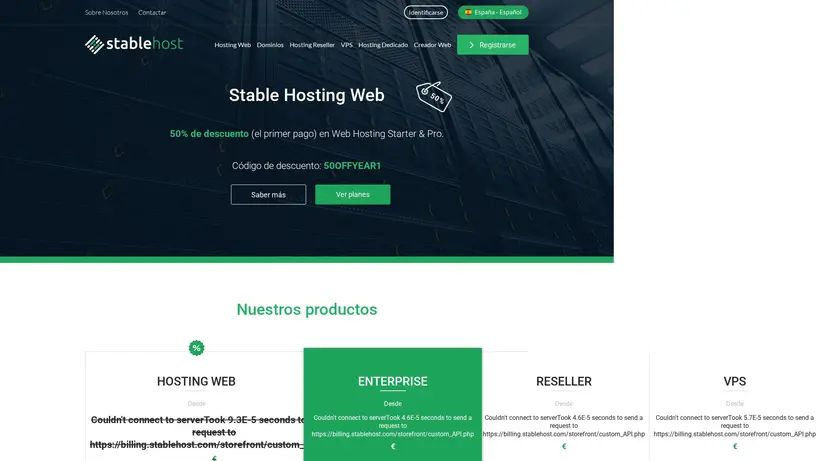
StableHost.es hosting deals homepage promo codes page screenshot

What Should You Confirm Before Paying?

The purchase decision changes at checkout. Familiar controls and useful technology names can create confidence during research, but payment requires a different standard. A buyer needs to understand the exact product, first invoice, renewal cost, operational limits, support scope, and protections that apply if the service does not meet expectations.

This does not require an exhausting technical audit. A short written checklist can resolve the key uncertainties. Identify the intended workload, ask StableHost to map it to a plan, request the complete commercial terms, then confirm location and operational commitments where those affect the project. Save the answers. Clarity before payment is cheaper than recovery after launch.

Compare Starter and Pro Without Guessing

StableHost identifies Web Hosting Starter and Web Hosting Pro and advertises 50% off the first year for both. It also publishes a general starting price of $4.95 per month. Those facts create a reason to investigate, but they do not reveal the exact price of either plan or prove that the general starting amount belongs to Starter.

The plan comparison must therefore begin with workload rather than price. Ask how Starter and Pro differ in domains, mailboxes, storage, CPU, memory, databases, application limits, and other governed resources. Ask which difference would affect your site. If the answer identifies no relevant constraint, Starter may be the sensible choice. If Pro solves a documented requirement, the upgrade becomes understandable.

Neither plan should receive invented specifications. The shared documented capabilities are cPanel, domain and email management, and one-click installation. Those features establish a common workflow, not equal capacity. Shared tools do not prove shared limits.

A practical comparison request might describe one WordPress site, several mailboxes, current storage use, expected growth, and any additional domains. StableHost can then recommend Starter or Pro and provide the applicable boundaries. Ask for that answer in writing, particularly if the distinction affects migration or renewal planning.

The same method applies beyond shared hosting. Compare Enterprise, Reseller, or VPS only after identifying a requirement the shared plans cannot meet. Request complete specifications and management responsibilities. An advanced family should solve a named limitation rather than provide emotional insurance against uncertain growth.

Separate Introductory Price From Long-Term Cost

A 50% first-year discount can make the opening invoice attractive. It does not reveal the original price, billing commitment, total due today, or renewal amount. The general $4.95-per-month starting statement also does not establish the billing term behind that amount. A buyer should not combine separate commercial claims into a price StableHost has not published for a named plan.

Ask five direct questions: What is the exact price of the selected plan? Which billing term produces it? What total is due at checkout? Are setup or additional fees charged? What amount applies at the first renewal? These answers turn a promotional headline into a usable budget.

Imagine a side-project owner expecting the opening monthly equivalent to continue. The project may remain affordable, but that cannot be known until the renewal amount is clear. Comparing the total promotional term with the next term prevents a pleasant first invoice from becoming an unexplained later expense. A discount describes the opening period; value depends on the continuing bill.

published cancellation terms conditions need the same discipline. No usable published cancellation terms window or published cancellation terms guarantee is published in the available facts. That absence does not prove no policy exists. It means no specific protection should be assumed. Ask whether the selected service qualifies for a published cancellation terms, which charges are eligible, what deadline applies, and which exclusions govern the request.

Budget planners who need complete published costs before any pre-sale exchange may find this uncertainty uncomfortable. Not for: buyers unwilling to request exact plan and renewal pricing before checkout. Buyers comfortable obtaining a written quote can still make a confident decision if the numbers fit.

Verify Resources, Location, and Service Terms

A plan price becomes meaningful only when the plan can carry the workload. StableHost publishes server-level descriptions involving enterprise-grade SSD drives, 96G of memory, dual CPUs, customized PHP, LiteSpeed, MySQL, a 200Gbps network, and unlimited bandwidth. These are useful platform signals. They do not establish the CPU, memory, storage, or capacity assigned to a particular customer account.

Server descriptions cannot replace plan-level allocations. A simple WordPress site may have modest needs, while a store, membership site, busy publication, or custom application may depend on stricter resource details. Ask for the selected plan’s governed limits and what happens when usage approaches them.

No measured speed result should be inferred from the technology list. This review did not conduct hands-on benchmarks or uptime monitoring. It therefore treats SSD storage, LiteSpeed, database customization, and the network statement as technical context rather than proof of a particular loading time, traffic capacity, or stability result.

Location is also unresolved. No usable StableHost datacenter city, state, or country is published in the review facts. Buyers concerned with audience proximity, regulatory rules, data-location policy, or latency should ask where the chosen plan runs and whether a location can be selected. A company phone number or market presence does not prove server geography.

Formal uptime terms are not available either. Buyers who require an SLA should ask whether the selected service carries one, how downtime is defined, which exclusions apply, and what remedy is available. A brochure site owner may accept practical tools without formal terms. A store or business-critical application may not. The correct choice depends on the cost of interruption.

Security provisions require confirmation as well. The available material does not establish included backups, restoration rules, malware handling, account isolation, patching responsibilities, certificates bundled with hosting, or disaster recovery procedures. “Enterprise-grade” hardware should not be translated into a security guarantee. Ask who protects each layer and what the customer must maintain.

These questions pay off the performance and reassurance parts of the decision. StableHost presents credible platform components and access to technicians, but buyers with mandatory infrastructure requirements need written detail. That does not weaken the fit for ordinary sites. It separates a practical shared-hosting purchase from a workload requiring contractual certainty.

Define Support Before an Urgent Moment

Support seems secondary until an installer fails, a domain stops resolving, or a deployment behaves differently from the expected environment. StableHost publishes [email protected] and 800 329 2166. It also states that technicians are available around the clock, 24/7/365. Those details give buyers identifiable ways to seek help.

Availability answers when help is presented as accessible; scope answers what help includes. The available facts do not establish contractual response times, resolution targets, escalation procedures, service credits, or identical support coverage across every product family. They also do not explain whether Shared, Enterprise, Reseller, and VPS customers receive the same operational assistance.

Ask one realistic pre-sale question based on your workload. A WordPress buyer might ask about migration and restoration. A developer might ask about a required PHP environment. An agency might ask how separate client accounts are handled. A VPS buyer should ask whether administration is managed or left to the customer. The precision of the answer helps clarify fit without pretending to measure support quality.

Migration deserves special attention because no migration terms are published. Confirm eligibility, cost, scheduling, files and databases included, mailbox handling, DNS responsibility, and expected interruption. Do not cancel an existing service until the new account and migration path are understood. That precaution protects data and reduces launch pressure.

The final comparison is now clear. Choose StableHost when cPanel, one-click installation, conventional developer technologies, domain and email management, and stated technician availability match your needs. Consider Starter first when StableHost confirms it covers the workload; choose Pro only when a documented limit or capability justifies it. Explore Enterprise, Reseller, or VPS only for a specific requirement.

Avoid if you require published plan prices, renewal terms, published cancellation terms protection, datacenter locations, formal uptime commitments, security provisions, or advanced-plan specifications without contacting the provider. StableHost can remain a candidate, but those conditions must be resolved before payment.

The buyer who began with a simple WordPress goal now has a workable decision. The documented tools support an approachable setup path. The hosting range offers possible room to discuss growth. Published contact details and around-the-clock technicians add reassurance. The remaining risk sits in missing plan, commercial, and infrastructure terms. StableHost is worth considering for familiar cPanel hosting when those unanswered details are confirmed in writing before checkout.


Performance: Calm Foundations, Limited Proof 4.5/5

Worry about a slow checkout usually arrives before the first visitor does. A WordPress buyer wants a site that feels dependable during publishing, browsing, and routine updates, but StableHost’s published material does not include independent speed tests, uptime history, or an published uptime terms. The fair reading is positive but measured: the infrastructure description offers useful signals, not measured performance proof. StableHost describes enterprise-grade SSD drives, 96G of memory, and dual CPUs for its servers. It also mentions customized versions of PHP, LiteSpeed, and MySQL, alongside an advertised 200Gbps network and unlimited bandwidth. Those details may support a reassuring technical foundation for ordinary websites. They do not establish a specific load time, visitor capacity, or uptime result for a particular plan. SSD storage and LiteSpeed are practical positives for a buyer comparing familiar shared hosting. They suggest that the provider has considered common web workloads rather than relying only on a basic control panel. A small business site, portfolio, or WordPress installation may benefit from that kind of platform design. Still, hardware language should not be mistaken for a test report. The network claim can also reduce one common concern: bandwidth limits are not presented as the main purchasing obstacle. That does not answer every traffic question. Resource allocations, account limits, and plan-specific performance details remain unpublished. A busy store, membership site, or campaign landing page therefore needs a more direct pre-purchase check. StableHost earns a measured 4.5 performance score because its published technology supports a credible everyday-hosting case, while the missing benchmarks prevent stronger certainty. Choose it when familiar hosting and sensible platform components matter more than published test data. Ask about plan resources, traffic handling, and uptime commitments before launch.

Features: Room For Practical Growth 4.6/5

A new site may begin with one domain and one mailbox, then quietly become a larger project. That growth feels easier when the account can handle everyday administration without forcing an immediate technical migration. StableHost’s clearest feature advantage is breadth: it markets Shared, Enterprise, Reseller, and VPS hosting, while its shared-hosting material highlights cPanel, domain and email management, and one-click installation. cPanel keeps routine administration familiar. Adding domains, creating email accounts, and managing common hosting tasks can feel less intimidating when the controls follow a known workflow. The one-click installer also suits WordPress and other popular scripts. For a first site or a small client project, that combination removes unnecessary setup work. Developers receive a broader published toolset. StableHost lists PHP 7.x and 8, MariaDB or MySQL, Perl, Python, Server Side Includes, and Git. That mix gives technically minded buyers useful compatibility clues. It does not confirm every version, module, limit, or configuration, so a project with strict deployment requirements should verify those details before purchase. The hosting range creates a plausible upgrade path within one brand. A buyer can compare shared hosting with Enterprise, Reseller, or VPS options without assuming that every plan has identical resources. The exact specifications for those families are not published in the available material. Growth flexibility is therefore a buying possibility, not a guaranteed migration plan. Unlimited bandwidth is another attractive published feature, particularly for buyers concerned about ordinary visitor increases. It should not be read as unlimited CPU, memory, storage, or permission to ignore fair-use terms. Those limits need confirmation. The 4.6 features score reflects useful control, installation, development, and product-range signals. StableHost fits buyers who want practical tools without assembling a custom stack. Buyers with specialized security, operating-system, VPS, or resource requirements should request the exact specifications first.

Ease: Familiar Setup, Fewer Early Friction Points 4.7/5

The first hosting session can be the moment a buyer wonders whether the project is already too technical. StableHost addresses that anxiety with a familiar cPanel workflow and a one-click installer for WordPress, Joomla, and other popular scripts. Those are meaningful conveniences because they move the buyer from account creation toward a working site without requiring every setup step to be performed manually. Domain and email management sit inside the same control-panel experience. For a small business owner, that matters more than a long feature list. One place for common account tasks can reduce the number of unfamiliar screens encountered during launch. A developer may appreciate the same simplicity when creating a quick test site or preparing a basic client installation. The practical journey is straightforward in principle: select a suitable hosting family, manage domains through cPanel, create email accounts, then use the installer for a common application. StableHost also publishes developer support for PHP 7.x and 8, MariaDB or MySQL, Perl, Python, Server Side Includes, and Git. That gives the setup process more useful depth than a purely beginner-focused account. The small caveat is that convenience does not reveal every boundary. Available facts do not specify migration terms, operating systems, resource limits, or the exact differences between Starter and Pro. A buyer moving an existing site should confirm the migration process rather than assume it is included. Someone deploying a specialized application should confirm compatibility before paying. The one-click installer is best understood as a strong starting point, not a complete WordPress maintenance promise. It can simplify installation; it does not establish backups, security provisions, update handling, or performance results. Those questions belong on the buyer’s checklist. Ease earns 4.7 because the documented workflow removes common setup friction while leaving specialized requirements for confirmation. StableHost is a comfortable fit for cPanel-oriented users, WordPress beginners, and small teams that value familiar administration. The experience becomes less certain when the project depends on undocumented migration or infrastructure details.

Support: Clear Access When Questions Surface 4.6/5

A hosting dashboard can feel perfectly obvious until a domain stops resolving or an installation takes an unexpected turn. At that point, the buyer wants a clear route to a person, not another vague promise. StableHost publishes [email protected] and 800 329 2166, and states that technicians are available around the clock, 24/7/365. Published contact details create useful reassurance. A new WordPress owner can identify an email route and phone number before checkout. A developer can also see that the provider presents technical assistance as part of the service rather than leaving support entirely to documentation. That clarity matters during launch, especially for buyers who do not want to troubleshoot every hosting issue alone. The around-the-clock availability claim supports a buyer who works outside standard business hours. It is relevant for publishing schedules, domain changes, and urgent setup questions. However, availability does not equal a guaranteed response time, resolution time, escalation process, or service credit. The available facts do not provide independent support measurements or a published response-time commitment. That does not make the support position weak, but it does limit what can be promised. Buyers should ask whether the published contacts apply to every hosting family, whether technical assistance covers migrations, and how urgent incidents are handled. These questions become more important for VPS, reseller, and business-critical workloads than for a simple personal site. The support material also does not establish a published cancellation terms policy, published uptime terms, or backup arrangement. Those are separate forms of reassurance, not substitutes for contact access. A helpful support route cannot by itself remove commercial or operational uncertainty. The 4.6 support score is fair for buyers who value identifiable contact options and stated technician availability. StableHost looks most comfortable for users wanting human assistance nearby during setup. Buyers requiring contractual response times or formal uptime remedies should obtain those terms in writing before ordering.

Pricing: Attractive Signal, Incomplete Checkout Picture 4.4/5

The first price often feels like the easiest part of choosing hosting. Then the buyer reaches checkout and starts asking the harder questions: Which plan is this? What billing term applies? What happens at renewal? StableHost publishes a general starting price of $4.95 per month and advertises 50% off the first year for Web Hosting Starter and Pro. The available plan facts do not provide exact plan-level prices, billing terms, setup fees, or renewal prices. The promotion is useful as an opening signal, not a final budget. It indicates that Starter and Pro may be marketed with a first-year discount, but it does not establish the exact amount payable for either plan. The general starting price also cannot safely be assigned to Starter or Pro. Buyers planning monthly cash flow should confirm the displayed currency, term, introductory price, renewal price, and any additional fees before payment. That distinction protects against a common shopping mistake: treating a promotional headline as the long-term cost. A low initial bill can still be suitable, but only when the renewal calculation is clear. StableHost’s hosting families also include Enterprise, Reseller, and VPS options, yet their resource allocations and plan prices are not available here. Comparing them requires direct confirmation rather than assumptions about what the next tier includes. Fair pricing means explainable pricing. Ask for the complete first invoice and later renewal amount. Confirm whether the discount applies to the selected term, whether setup costs exist, and whether the same commercial conditions apply after the first year. published cancellation terms or published cancellation terms terms are also not published in the available facts, so do not assume a guarantee. Use Product Plans as the comparison point, then treat every missing commercial detail as a checkout question. The Starter and Pro entries preserve their documented cPanel, domain, email, and installer positioning without pretending that resource limits are known. Pricing earns 4.4: the advertised starting price and first-year promotion are appealing, but long-term value cannot be judged confidently until exact prices and renewal terms are confirmed. StableHost suits buyers willing to verify the bill before ordering, not buyers who need fully published lifetime costs upfront.

Which StableHost Web Hosting Plan Fits Best?

Choosing between Web Hosting Starter and Web Hosting Pro can feel deceptively simple when both sit beneath the same first-year promotion. Begin with your real workload: domains, mailboxes, application requirements, current storage, expected traffic pattern, and whether the project is new or migrating. Then ask StableHost to identify the plan that covers those needs and provide its CPU, memory, storage, bandwidth, domain, and email limits.

The documented plans share a cPanel-oriented workflow with domain and email management plus one-click installation. Their exact prices, billing terms, resource allocations, setup fees, and renewal charges are not published here. StableHost advertises 50% off the first year for Starter and Pro, but that promotion does not establish either plan's checkout or renewal cost. Compare the complete first-term payment with the later renewal amount, then choose the smallest plan whose limits and support scope are clear.

Web Hosting

MINI

$2.11/mo

Source price; renewal not listed.

  • Control PanelcPanel
  • InstallerOne-click installer
  • Free SSLYes
  • Storage5GB
  • Websites1
  • DDoS Protection2Gbit/s
  • Bandwidth500GB
Get Deal

STARTER

$12.71/mo

Source price; renewal not listed.

  • Control PanelcPanel
  • InstallerOne-click installer
  • Free SSLYes
  • StorageUnlimited
  • Websites1
  • DDoS Protection2Gbit/s
  • BandwidthUnlimited
Get Deal

PRO

$20.13/mo

Source price; renewal not listed.

  • Control PanelcPanel
  • InstallerOne-click installer
  • Free SSLYes
  • StorageUnlimited
  • WebsitesUnlimited
  • DDoS Protection2Gbit/s
  • BandwidthUnlimited
Get Deal

PLATINUM

$46.51/mo

Source price; renewal not listed.

  • Control PanelcPanel
  • InstallerOne-click installer
  • Free SSLYes
  • StorageUnlimited
  • WebsitesUnlimited
  • DDoS Protection2Gbit/s
  • BandwidthUnlimited
Get Deal

Reseller Hosting

PRO

$ 23.31/mo
  • Accounts50
  • Storage40GB
  • WHMYes
  • Free SSLYes
Get Deal

PLUS

$ 34.97/mo
  • Accounts100
  • Storage60GB
  • WHMYes
  • Free SSLYes
Get Deal

BASIC Copy

$ 11.65/mo
  • Accounts10
  • Storage20GB
  • WHMYes
  • Free SSLYes
Get Deal

VPS Hosting

VZ 1GB

$ 12.18/mo

For people who recently outgrew shared hosting.

  • vCPU1 Core
  • RAM1024MB
  • Storage40GB
  • Bandwidth2TB
  • Network1000Mbit
Get Deal

VZ 2GB

$ 18.01/mo

For a busy blog or medium sized forum.

  • vCPU2 Core
  • RAM2048MB
  • Storage60GB
  • Bandwidth2TB
  • Network1000Mbit
Get Deal

VZ 4GB

$ 36.56/mo

For a busy blog or medium sized forum.

  • vCPU4 Core
  • RAM4096MB
  • Storage100GB
  • Bandwidth4TB
  • Network1000Mbit
Get Deal

VZ 8GB

$ 73.40/mo
  • vCPU6 Core
  • RAM8192MB
  • Storage200GB
  • Bandwidth8TB
  • Network1000Mbit
Get Deal

Dedicated Server

PROFESSIONAL

$ 145/mo
  • CPUIntel Pentium G3450 3.4GHz 2C
  • RAM4 GB RAM
  • StorageHard drives 2 x 300 GB SAS
  • BandwidthTraffic 2 TB
Get Deal

PREMIUM

$ 165/mo
  • CPUIntel Xeon E3-1240L v3 2.0GHz 4C
  • RAM8 GB RAM
  • StorageHard drives 2 x 300 GB SAS
  • BandwidthTraffic 3 TB
Get Deal

ULTIMATE

$ 245/mo
  • CPUIntel Xeon E5-2603 v3 1.6GHz 6C
  • RAM16 GB RAM
  • StorageHard drives 2 x 300 GB SAS
  • BandwidthTraffic 4 TB
Get Deal

StableHost Works Best After a Clear Pre-Sale Check

StableHost makes a persuasive case for buyers who want familiar cPanel hosting and a direct setup path. Domain and email management, one-click installation for WordPress and other popular scripts, and published support for PHP 7.x and 8, MariaDB or MySQL, Perl, Python, Server Side Includes, and Git give conventional websites a practical starting point. Shared, Enterprise, Reseller, and VPS hosting also provide several product families to discuss as needs change.

Best for: new WordPress sites, small-business websites, cPanel users, teams managing routine domain and email tasks, and developers whose applications align with the named technologies. StableHost publishes [email protected] and 800 329 2166, plus stated technician availability around the clock. That can reassure buyers who want identifiable help when setup stops feeling obvious.

Not for: buyers who require exact renewal costs, formal uptime terms, a confirmed published cancellation terms window, known datacenter geography, detailed security provisions, or advanced-plan specifications before contacting sales or support. Those details are not published in the review facts. The gaps do not establish poor service, but they make verification part of the purchase.

For plan choice, begin with Web Hosting Starter if StableHost confirms it covers your sites, domains, mailboxes, storage, application, and resource needs. Choose Web Hosting Pro only when a documented difference solves a real constraint. Consider Enterprise, Reseller, or VPS after identifying a specific requirement that shared hosting cannot meet. Product names should not substitute for limits and management terms.

The pricing decision needs similar care. StableHost publishes a general starting price of $4.95 per month and advertises 50% off the first year for Starter and Pro, but exact plan prices, billing terms, setup fees, and renewal charges remain unavailable. Request the complete first invoice and renewal amount before paying.

Is StableHost worth it? Yes, conditionally. It fits buyers prioritizing cPanel, straightforward installation, conventional developer tools, and access to technicians. Confirm the exact plan, long-term bill, location, uptime terms, published cancellation terms conditions, resources, migration scope, and support responsibilities first. Good fit first. Clear terms second. Payment last.

Frequently Asked Questions about StableHost

StableHost suits buyers who value familiar hosting tools, but several commercial and infrastructure details need confirmation before checkout.

Is StableHost suitable for WordPress?
StableHost is a practical candidate for a new WordPress site because it publishes a one-click installer for WordPress and other popular scripts. cPanel also gives buyers a familiar place to manage domains and email accounts. That combination fits a portfolio, business site, blog, or other conventional project where easier setup matters. However, the published details do not establish managed WordPress services, backups, updates, migration assistance, security provisions, or plan-level resources. Confirm those items if your site depends on them, especially before moving an established or business-critical installation.
Does StableHost include cPanel?
StableHost identifies cPanel as the control-panel environment for adding and managing domain and email accounts. This can reduce setup anxiety for buyers who already know cPanel or prefer a conventional hosting workflow over a proprietary dashboard. It is particularly relevant to small teams managing routine website tasks without a dedicated administrator. The available details do not establish how many domains, mailboxes, or accounts each plan permits. Ask StableHost for the exact Starter and Pro limits before choosing between them, rather than assuming the control panel makes their capacities identical.
What developer tools does StableHost support?
StableHost publishes support for PHP 7.x and 8, MariaDB or MySQL, Perl, Python, Server Side Includes, and Git. That list makes the service worth considering for conventional websites and applications built around those technologies. It remains an initial compatibility screen, not a complete deployment specification. Exact versions, extensions, database releases, shell access, scheduled-task support, process limits, and configuration permissions are not documented here. Send StableHost your application requirements before purchasing, particularly if deployment depends on a specific runtime, extension, system setting, or command-line workflow.
How can I contact StableHost support?
StableHost publishes [email protected] and 800 329 2166. It also states that technicians are available around the clock, 24/7/365, which offers useful reassurance when setup or hosting questions occur outside normal business hours. The available facts do not establish a contractual response time, resolution target, escalation process, or identical support scope across Shared, Enterprise, Reseller, and VPS hosting. Before ordering, ask whether your likely needs—such as migration, application troubleshooting, restoration, or VPS administration—fall within support. Availability explains when technicians are presented as accessible; written scope clarifies what assistance includes.
How much does StableHost cost?
StableHost publishes a general starting price of $4.95 per month and advertises 50% off the first year for Web Hosting Starter and Pro. Those statements do not establish the exact price of either plan, the required billing term, the checkout total, setup fees, or renewal cost. Treat the promotion as a reason to request a quote, not as a complete long-term budget. Before paying, confirm the selected plan, amount due immediately, commitment length, first renewal charge, and any additional fees. Save that information so the promotional period and continuing cost remain easy to compare.
Does StableHost publish an uptime guarantee or refund policy?
No usable uptime SLA, uptime history, refund window, or money-back guarantee is available in the review facts. That absence does not establish that StableHost lacks such policies; it means buyers should not assume specific terms. If availability is important, ask how downtime is defined, which exclusions apply, and whether the selected service carries a remedy. If purchase protection matters, request the applicable refund policy and identify eligible products, charges, deadlines, and exclusions. Obtain both answers before payment, especially when moving a live store, client site, or other workload that cannot tolerate unclear commitments.
Where are StableHost servers located?
Usable datacenter locations are not published in the available facts, so no country, state, or city can be stated responsibly. Buyers choosing hosting by audience proximity, regulatory requirements, or data-location policy should ask where the selected plan will run and whether location choice is available. Confirm whether Shared, Enterprise, Reseller, and VPS products use the same locations and whether a location changes price, features, or migration options. Hardware and network descriptions do not answer geography. A company address, telephone number, or market focus should never be treated as proof of a server location.

STABLEHOST ALTERNATIVES

4.9
  • Starting Price $5.59/mo
4.8
  • Starting Price $11.99/mo
4.7
  • Starting Price $1.00/mo
4.6
  • Starting Price €10.95/mo