

Inside HostDare VPS Performance, Routing, Support, and Pricing

A small import business does not wake up thinking about benchmark charts. It worries about whether customers in Asia can reach order forms without strange delays, whether a developer can fix a server problem without waiting for managed support, and whether bill still makes sense when project grows. That is why this HostDare review works best as regional-fit buying guide, not generic hosting roundup. HostDare matters most when you already have map in mind: Los Angeles for West Coast placement, Osaka for Japan-focused reach, or CN2 GIA positioning for China-route planning.
That buyer might be running lightweight SaaS dashboard, staging server for regional clients, small WordPress site that has outgrown shared hosting, or technical project where route choice matters more than brand polish. Worry feels familiar: “Will I get enough control without paying for extras I do not use?” Supplied evidence points to VPS and web hosting product families, with KVM VPS options, NVMe and HDD choices, full root access, Server Control Panel access, and documented VPS locations in Los Angeles and Osaka. It also shows shared hosting with cPanel, application installs, email tools, FTP accounts, and MySQL allocations for buyers who want less server administration.
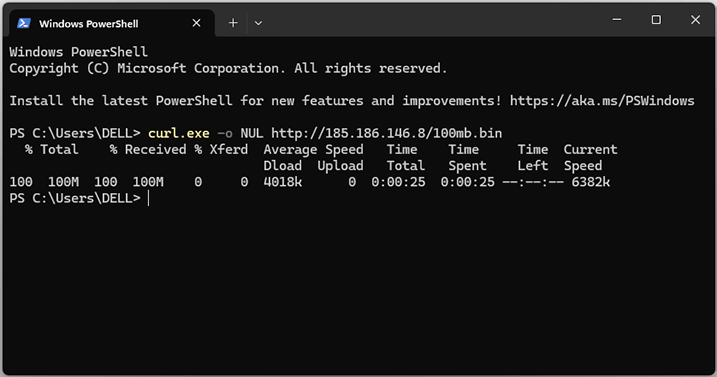
Methodology: this review uses only supplied HostDare evidence: product tables, plan specs, support references, refund terms, location statements, operating-system notes, and policy text. It does not claim hands-on speed testing, independent uptime monitoring, trust scores, customer counts, or response-time results because those are not published in supplied evidence. Where evidence is missing, safer read is to treat it as buyer checklist item, not reason to invent certainty.
Decision path is simple. First, check whether HostDare’s regional map matches your project. Second, decide whether you want unmanaged VPS control or easier shared hosting. Third, compare plan families by job: low-cost Linux VPS, storage-heavy VPS, Windows workload, Osaka placement, or China-optimized route. Short version: HostDare looks strongest for technical buyers who value regional fit, clear VPS resource tables, and low-entry annual plans more than managed-hosting hand-holding. It looks less ideal if you need provider-managed backups, published renewal pricing, included Windows licensing, or detailed SLA credit terms before checkout.
Why Regional Buyers Notice HostDare
Picture operations lead in Singapore working with clients in California and vendors in Japan. Biggest global logo is not always best answer. What matters is route logic, server control, and whether provider lets buyer choose region without decoding vague marketing. HostDare enters conversation because supplied evidence points to several VPS paths tied to practical geography: Los Angeles for cheap NVMe KVM, AMD NVMe KVM, Budget HDD KVM, and CN2 GIA NVMe KVM; Osaka for Cheap Japan NVMe KVM. For regional buyers, that is not decoration. It shapes shortlist before first invoice.
This matters if you are building around “near enough” latency and predictable placement rather than giant worldwide footprint. Los Angeles VPS can make sense for West Coast-facing sites, developer environments serving North American users, or Asia-to-US workflows where LA is expected handoff point. Osaka can matter for Japan-facing test environments, content projects, and small business sites with local audience. CN2 GIA positioning matters when buyer is comparing China-optimized route options and wants evidence of that product family rather than generic “Asia optimized” phrasing.
Best for: HostDare is best for regional VPS buyers who need Los Angeles hosting, Asia-focused buyers comparing Japan and China-route options, developers comfortable with unmanaged VPS work, budget-sensitive VPS shoppers comparing annual low-end plans, and shared hosting buyers who want cPanel-style site management. That is clear buyer lane. It is not trying to be every type of hosting for every type of site.
Not for: HostDare is not for buyers who need managed VPS administration, provider-managed backups, published renewal pricing before checkout, included Windows licenses, detailed SLA credit terms, or proven live-chat availability. Avoid if your team expects host to patch stack, tune application, maintain backups, and restore data after app-level mistake. Supplied evidence describes unmanaged VPS and places backup responsibility clearly on customer side.
Los Angeles As Practical Default
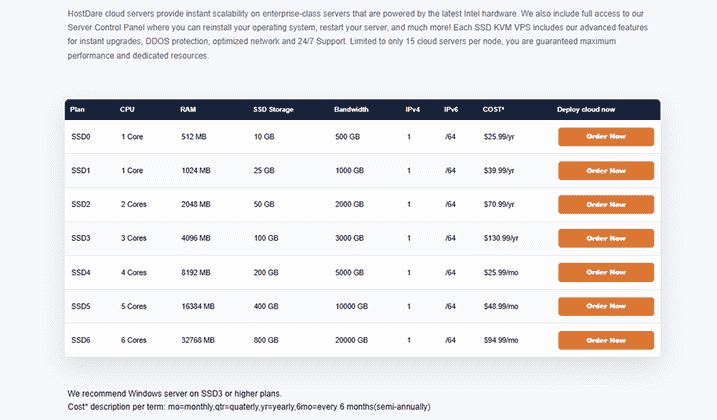
Los Angeles appears across multiple HostDare VPS families, which makes it practical default in supplied evidence. Standard Budget NVMe VPS line starts at SSD0 with 1 Core, 512 MB RAM, 10 GB SSD, 500 GB bandwidth, 1 IPv4, and /64 IPv6 at $25.99/yr. AMD NVMe starts with ASSD0 at $27.99/yr, adding 768 MB RAM while keeping 1 Core, 10 GB SSD, 500 GB bandwidth, 1 IPv4, and /64 IPv6. Budget HDD KVM starts at HDD1 with 1 Core, 1 GB RAM, 50 GB HDD, 1000 GB/mo bandwidth, 1 IPv4, and 500 mbps uplink at $39.99/yr.
Those numbers matter because each line gives different meaning to “cheap VPS.” SSD0 is lowest evidenced annual VPS entry. ASSD0 is AMD NVMe entry. HDD1 trades disk-speed expectations for larger storage and monthly bandwidth wording. If buyer only asks “what is cheapest?” SSD0 may answer. If buyer asks “what feels safer for slightly more memory?” ASSD0 or HDD1 becomes more interesting. Cheap is not one thing; it is trade-off shape.
Los Angeles also hosts CN2 GIA NVMe KVM according to supplied evidence. That line starts at CSSD0 with 1 Core, 768 MB RAM, 10 GB NVMe SSD, 250 GB/mo bandwidth, 1 IPv4, and 30 mbps uplink at $40.99/yr. It costs more than lowest standard NVMe entry, but product context differs: supplied evidence identifies CN2 GIA as China optimized and as premium option for data transfer to and from China. Buyer considering that plan should compare route need first, not raw storage or bandwidth alone.
Osaka And China-Route Decisions
Cheap Japan NVMe KVM gives HostDare more specific Asia angle. NKVM0 is evidenced at $25.99/yr with 1 Core, 768 MB RAM, 10 GB SSD, 500 GB bandwidth, 1 IPv4, and /64 IPv6. NKVM1 moves to 1024 MB RAM and 25 GB SSD at $39.99/yr. NKVM2 moves to 2 Cores, 2048 MB RAM, 50 GB SSD, and 2000 GB bandwidth at $70.99/yr. NKVM3 reaches 3 Cores, 4096 MB RAM, 100 GB SSD, and 3000 GB bandwidth at $130.99/yr.
Buyer tension here is simple: should you place closer to Japanese users, or use Los Angeles because it is familiar and maybe more relevant to your team? HostDare’s Osaka evidence helps when Japan reach is main concern. Small agency building for Japanese audience, developer testing application behavior in region, or business checking Asia route behavior gets cleaner starting point from Osaka line than from generic US VPS.
CN2 GIA plans deserve separate attention because buyer motive is different. Someone choosing CSSD0, CSSD1, CSSD2, CSSD3, or CSSD4 probably is not comparing only CPU and disk. They care about China-facing route behavior, predictable transfer path, and whether higher route-focused plan makes sense. HostDare evidence says CN2 GIA is China optimized and identifies CN2 GIA NVMe KVM VPS as hosted on CN2 GIA network in Los Angeles. Choose route before resources. If China-optimized routing is not relevant, standard NVMe, AMD NVMe, Japan NVMe, or HDD KVM may be calmer value choice.
HostDare earns attention in this regional context because supplied evidence is clear enough to support buying decisions. It does not publish full datacenter facility details, detailed network map, independent uptime tests, or measured performance benchmarks. That missing data should not be ignored. But for buyer comparing regional VPS options, specific Los Angeles and Osaka evidence, plus CN2 GIA positioning, creates practical reason to keep HostDare on shortlist.
What HostDare Feels Like After Signup
Imagine VPS arrives and first excitement turns into checklist: log in, confirm IPs, choose operating system, lock down SSH, install packages, schedule backups, test routes, and watch resource use. HostDare’s evidence suggests this moment will feel good to technical buyers and less cozy to beginners. VPS is described as unmanaged, with full root SSH/SFTP access and Server Control Panel access for reinstalling operating system, restarting server, and related tasks. That is freedom. It is also responsibility with invoice attached.
Emotional split matters. Developer sees root access and thinks, “Good, nobody blocks me.” Business owner without sysadmin help sees same phrase and thinks, “Who fixes it when I break it?” HostDare’s strongest fit is first buyer. Supplied evidence supports control: KVM virtualization, full root access, VPS panel references, custom ISO documentation, operating system reinstall options, and Windows Server compatibility across several VPS families. But it also gives clear caveats: Windows licenses are not provided, customers should not rely on HostDare for backups, and terms say HostDare does not take backups of client websites.
Control Panel As Safety Net
Server Control Panel access changes how self-managed VPS feels. If OS install fails or configuration experiment goes wrong, ability to reinstall operating system or restart server reduces panic. HostDare evidence includes those control functions. Documentation evidence also points to VPS panel login and custom ISO handling. For buyer running staging environment, dev sandbox, or test deployment, this matters. You can make mistake, recover, and keep learning without turning every basic action into support request.
Small relief moment: first-time VPS buyer often fears “I will be locked out and helpless.” Panel access does not remove that risk entirely, but it gives practical recovery path. It also aligns with unmanaged model. HostDare does not need to be managed provider if it gives capable users enough tools to manage their own server lifecycle.
Custom ISO evidence adds flexibility for advanced users. Supplied documentation references adding custom operating system ISO, with evidenced limits: 5000 MB per ISO, 3 ISOs at one time, maximum overall size 10000 MB, and ISOs deleted 24 hours after upload. Those details are not flashy, but they help technical users plan. If your installation workflow depends on custom ISO, knowing limits before setup saves irritation.
Windows Planning Needs Discipline
HostDare evidence lists operating system choices including CentOS, Debian, Fedora, Ubuntu, SUSE, and Scientific Linux. That gives Linux users familiar starting points. Windows Server compatibility is also evidenced across cheap NVMe, AMD NVMe, Budget HDD KVM, CN2 GIA NVMe, and Cheap Japan NVMe families. But Windows comes with important limits: HostDare does not provide Windows licenses, and buyer is responsible for obtaining and using own Windows license.
This is not small footnote. Buyer planning remote desktop workflow, Windows app testing, or Windows-based tools must budget license and choose larger plan. HostDare evidence recommends SSD3 or bigger for Windows on cheap NVMe, ASSD3 or bigger for AMD NVMe, HDD3 or bigger for Budget HDD KVM, CSSD3 or bigger for CN2 GIA, and NKVM3 or bigger for Cheap Japan NVMe. Those recommendations turn low-cost entry plan into “not ideal for Windows” path.
That is helpful guidance if you read it early, and annoying surprise if you skip specs. For Linux projects, SSD0, ASSD0, HDD1, CSSD0, or NKVM0 may be sensible depending on region and workload. For Windows projects, entry plans are not where HostDare points you. “Windows compatible” does not mean “Windows license included” or “smallest plan recommended.” Plan up if Windows matters.
Backups And Support Expectations
Backup policy is where HostDare demands adult buyer behavior. Terms evidence says HostDare does not take backups of client websites, customers should not rely on HostDare for backups, and clients should back up data themselves. That makes review more useful, not less. If you are comfortable running off-server backups, snapshots through your own tooling, or application-level exports, this is manageable. If you expect provider-managed restore button, this is not right fit unless separate backup arrangement exists outside supplied evidence.
Picture small store owner moving WordPress site from shared hosting to VPS because traffic improved. Server feels faster, control feels exciting, then plugin update breaks site. If backup lives only on same server, relief disappears. HostDare’s terms push buyer toward independent backup workflow from day one. That belongs in migration checklist before launch, not after incident.
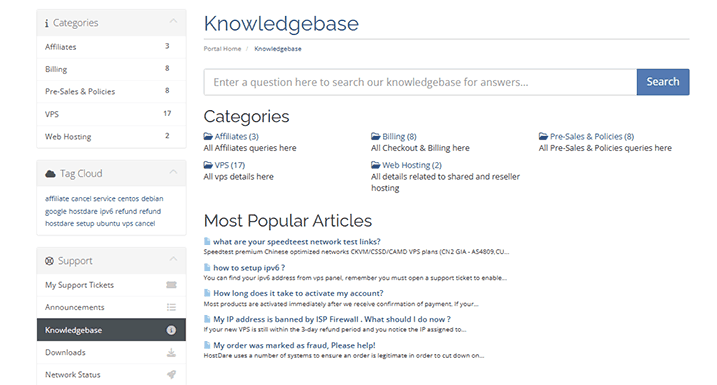
Support evidence is reassuring but should be interpreted correctly. HostDare shows sales email, phone number, Customer Portal, Submit Ticket, Knowledgebase, [email protected] for privacy questions, and [email protected] for intellectual-property abuse reports. Evidence includes 24/7 or 24/7/365 support claims across VPS, CN2 GIA, homepage, and shared hosting pages. Knowledgebase evidence covers practical VPS tasks such as IPv6 setup, VPS management, custom ISO use, Windows language changes, and node-name lookup. Buyer expectation should be “support exists and technical docs exist,” not “instant managed engineer fixes my stack.”
 Performance: Strong Regional Calm